

This is the sixth article in the Android Perfetto series, mainly introducing knowledge related to 120Hz refresh rate on Android devices. Nowadays, 120Hz has become standard configuration for flagship Android phones. This article will discuss the advantages and challenges brought by high refresh rates, and analyze the working principle of 120Hz from a system perspective.
Over the past few years, the refresh rate of mobile device screens has evolved from 60Hz to 90Hz, and then to the now common 120Hz. This improvement not only brings smoother visual experience, but also puts forward new requirements for system architecture and application development. Through the Perfetto tool, we can more intuitively understand the process and performance of frame rendering on high refresh rate devices.
Table of Contents
- Perfetto Series Catalog
- Basic Concepts
- System Implementation and Principles
- Advantages and Challenges of 120Hz
- Thoughts and Future Outlook
- Conclusion
- About Me && Blog
Perfetto Series Catalog
- Android Perfetto Series Catalog
- Android Perfetto Series 1: Introduction to Perfetto
- Android Perfetto Series 2: Capturing Perfetto Traces
- Android Perfetto Series 3: Familiarizing with the Perfetto View
- Android Perfetto Series 4: Opening Large Traces via Command Line
- Android Perfetto Series 5: Choreographer-based Rendering Flow
- Android Perfetto Series 6: Why 120Hz? Advantages and Challenges
- Android Perfetto Series 7: MainThread and RenderThread Deep Dive
- Android Perfetto Series 8: Understanding Vsync and Performance Analysis
- Android Perfetto Series 9: Interpreting CPU Information
- Android Perfetto Series 10: Binder Scheduling and Lock Contention
- Video (Bilibili) - Android Perfetto Basics and Case Studies
- Video (Bilibili) - Android Perfetto: Trace Graph Types - AOSP, WebView, Flutter + OEM System Optimization
If you haven’t seen the Systrace series yet, here is the portal:
- Systrace Series Catalog: Systematically introduced the use of Systrace, the predecessor of Perfetto, and used Systrace to learn and understand the basic rules of Android performance optimization and Android system operation.
- Personal Blog: Personal blog, mainly content related to Android, and also put some content related to life and work.
Welcome everyone to join the WeChat group or Planet on the About Me page to discuss your problems, the parts about Perfetto you most want to see, and discuss all Android development related content with group friends.
Basic Concepts
What is Screen Refresh Rate?
Screen refresh rate is a hardware concept, referring to the number of times the screen refreshes the display content per second, in Hertz (Hz).
- 60Hz screen: Refresh 60 times per second, each refresh interval is about 16.67ms
- 90Hz screen: Refresh 90 times per second, each refresh interval is about 11.11ms
- 120Hz screen: Refresh 120 times per second, each refresh interval is about 8.33ms
The screen refresh rate determines the highest frame rate that the display device can display, but the screen is only responsible for displaying content at a fixed frequency, and the specific content displayed is determined by the software system.
What is FPS?
FPS (Frames Per Second) is a software concept, referring to how many frames of content the system generates per second for the screen to display.
- 60FPS: The system generates 60 frames of content per second, with about 16.67ms processing time per frame
- 90FPS: The system generates 90 frames of content per second, with about 11.11ms processing time per frame
- 120FPS: The system generates 120 frames of content per second, with about 8.33ms processing time per frame
To get the best visual experience, ideally FPS should match the screen refresh rate, but the actual experience is closely related to the content type and user perception:
Content Type Difference:
- Video Content: Movies (24fps) or videos (30fps) look smooth even on 120Hz screens because video content contains natural motion blur and matches viewer expectations for the medium.
- Interactive Interface: Scrolling lists, animations, and other interactive scenarios have higher requirements for frame rate. Dropping from 120fps to 110fps may be perceived as stuttering by users.
Frame Rate Stability: Stable low frame rate (such as stable 60fps) usually has a better experience than unstable high frame rate (such as fluctuating between 90-120fps).
System Behavior:
- When FPS is lower than the refresh rate, the display system will reuse frames or insert black frames.
- When FPS is higher than the refresh rate, excess frames will be discarded, causing waste of computing resources.
Different application scenarios have different smoothness standards, and developers need to choose appropriate optimization strategies according to the application type.
What is Vsync?
Vsync (Vertical Synchronization) is a mechanism that synchronizes software frame rate with screen refresh rate, aiming to avoid screen tearing phenomena. In Android systems, Vsync signals are used to trigger the timing for applications to render a new frame, ensuring that the rendering process remains consistent with the screen refresh cycle.
Why 120Hz Became the New Standard?
The evolution of the market from 60Hz to 90Hz and then to 120Hz has clear technical and user experience driving factors:
Higher Smoothness: 120Hz provides twice the visual information of 60Hz, making scrolling, animation, and other interactions feel more fluid and natural.
Reduced Latency: The delay from input event to display result is reduced from 16.67ms at 60Hz to 8.33ms at 120Hz, making user operation feedback more timely.
Mature Hardware Support: Modern mobile processors (such as Qualcomm Snapdragon 8 series, MediaTek Dimensity series) have enough performance to support stable operation of 120Hz.
Battery Technology Progress: More efficient battery and power management technologies alleviate the power consumption pressure brought by high refresh rates.
Variable Refresh Rate Technology: Adaptive refresh rate technologies like LTPO allow devices to intelligently switch refresh rates in different scenarios, balancing smoothness and power consumption.
Nowadays, 120Hz is not only standard for Android flagship models, but even iOS devices (iPhone 13 Pro and above) also support 120Hz ProMotion technology, marking that high refresh rate has become a basic feature of high-end mobile devices.
System Implementation and Principles
120Hz Rendering Process from Perfetto’s Perspective
At 120Hz refresh rate, the rendering process of the Android system has not changed fundamentally. The main difference is that the time budget for each frame is shortened from 16.67ms to 8.33ms (Of course, App duration is not discussed here. If App Duration configuration is greater than 8.33ms, then it is acceptable for App’s UI + Render to be completed within the App duration interval. Note that App Duration configuration varies by machine). The specific rendering Perfetto trace of the application in 120Hz environment is shown below:
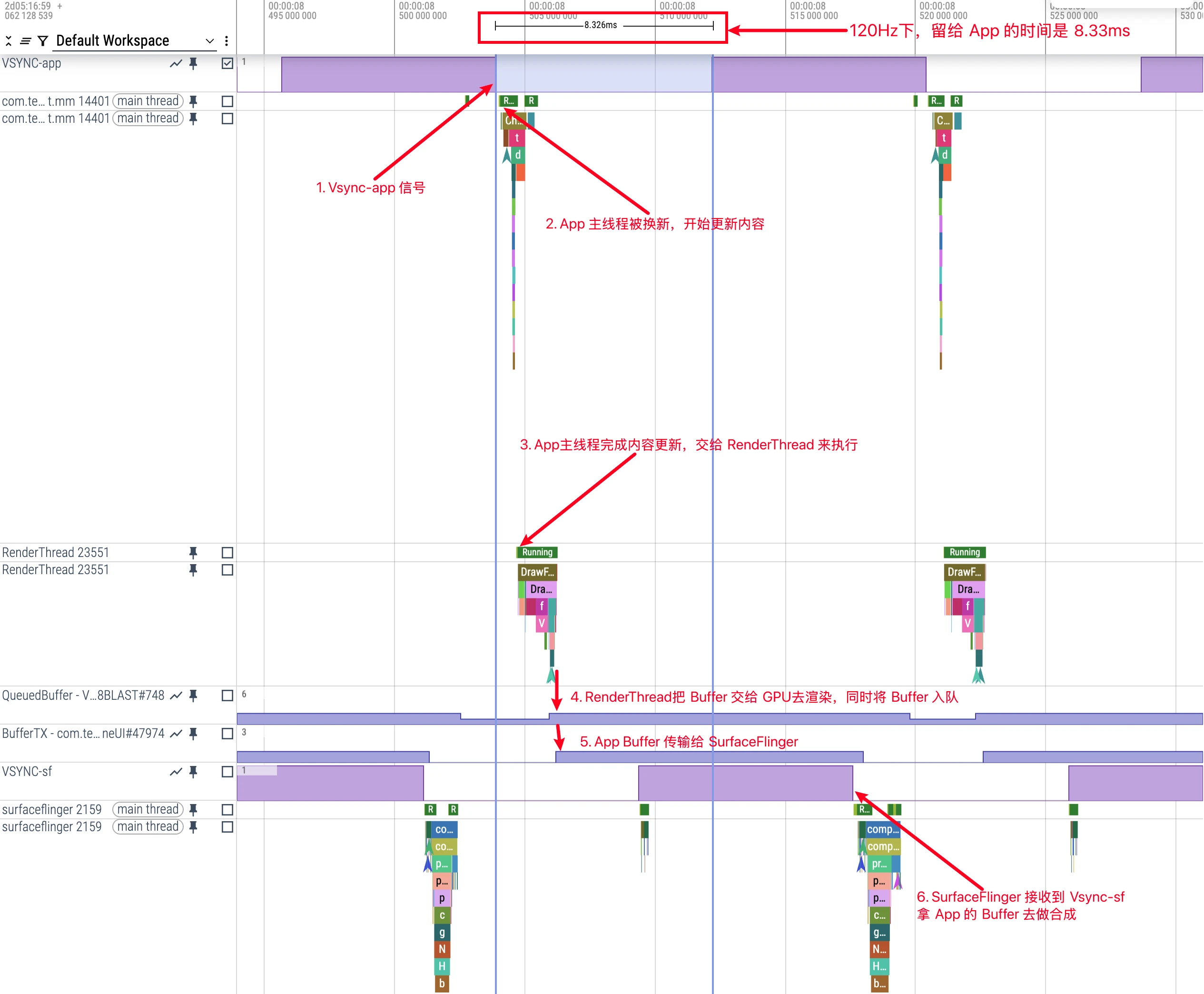
On 120Hz devices, we can see:
- Vsync Interval: VSYNC signal triggers once every 8.33ms
- Frame Processing Flow: Processing of each frame still follows the order of Input → Animation → Traversal
- Time Compression: All processing steps must be completed in a shorter time, placing higher demands on system and application performance
Two Buffer-related Traces appear in the figure above. Here is a brief explanation:
- QueuedBuffer: (e.g., QueuedBuffer - VRI[ImproveSnsTimelineUI]#748BLAST#748)
- This Trace Tag is printed in the App Process
- Indicates that the application has finished rendering one frame and put the rendered Buffer into the queue preparing to submit to SurfaceFlinger
- In systems using BlastBufferQueue, this moment marks that RenderThread completes rendering and is ready to transmit the result to system service
- BufferTX: (e.g., BufferTX - com.tencent.mm/com.tencent.mm.plugin.sns.ui.improve.ImproveSnsTimelineUI#47974)
- This Trace Tag is printed in the SurfaceFlinger Process
- Indicates the moment SurfaceFlinger receives the Buffer transmitted from the application and starts processing
- TX stands for “Transfer/Transmission”, implying the transmission process of the buffer
The correct process should be:
- App’s RenderThread calls
queueBuffer. At this time, the App considers itself to have handed over a Buffer, soQueuedBuffer+1. - The Buffer is transmitted to SF. After SF receives (latch/acquire) it,
BufferTX+1. - SF uses this Buffer to complete composition and display on screen in a future Vsync cycle.
- When SF no longer needs this Buffer (for example, it has been replaced by a new frame, or has been stably displayed for enough time), SF will release this Buffer.
- After SF releases the Buffer,
BufferTX-1. At the same time, the App will receive a callback that the Buffer has been released. At this time, the App side’sQueuedBufferwill only -1, indicating that this Buffer has successfully returned to the buffer pool and can be used again.
Perfetto also provides Buffer tracking function. Click Actual Timeline above App (this part of knowledge can be seen at Actual Timeline Introduction), and you can see the whole process of this Buffer from production to consumption.
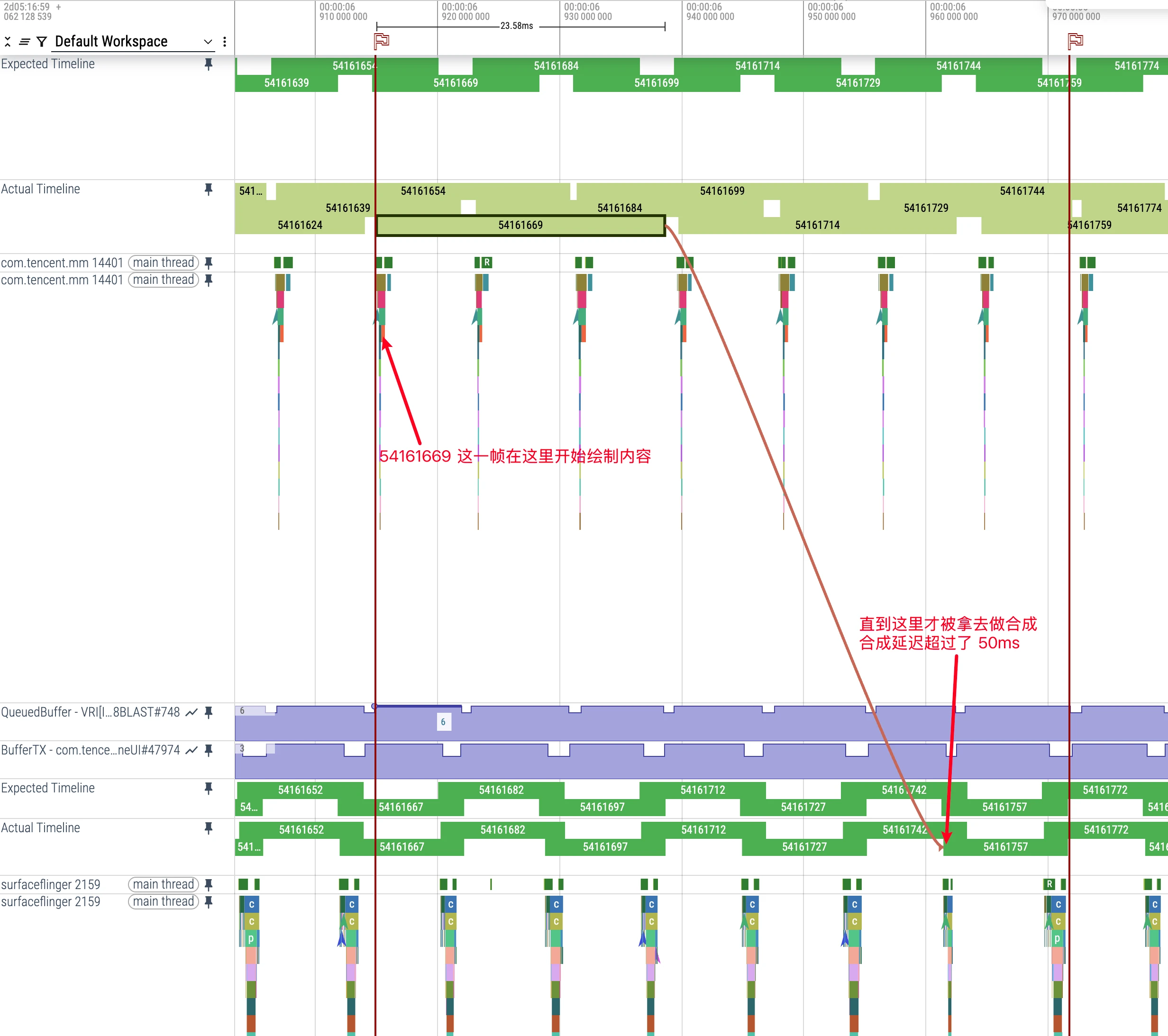
System Architecture Optimization Supporting 120Hz
To support 120Hz high refresh rate smoothly, Android system architecture has made many adjustments and improvements. These changes involve multiple components, covering important optimizations of the entire rendering pipeline. Let’s look at several key technical points in detail:
Adaptive Refresh Rate Technology
Modern Android devices adopt multi-level refresh rate management strategies:
Hardware Layer Support: LTPO (Low Temperature Polycrystalline Oxide) display technology allows the screen to precisely adjust refresh rate within the range of 1Hz to 120Hz, rather than switching between fixed gears.
Content Perception Algorithm: The system automatically adjusts refresh rate by analyzing screen content types:
- Static content (reading, picture browsing): Drop to 10-30Hz
- Video playback: Match video source frame rate (usually 24-60Hz)
- Scrolling and interaction: Increase to 90-120Hz
- Games: Dynamically adjust according to game engine output frame rate
API Support: Android provides
Surface.setFrameRate()API, allowing applications to explicitly specify their preferred frame rate, and the system will try its best to meet this request.
1 | // Application can specify preferred frame rate and refresh rate behavior |
Advantages and Challenges of 120Hz
Experience Improvements Brought by 120Hz
When I got my first 120Hz mobile phone, the most intuitive feeling was:
Everything becomes smoother: From desktop sliding, application switching to browsing Weibo, screen updates are more frequent, and content follows finger movement more accurately. Especially when quickly sliding Moments or Weibo feed stream, the text is still clear and distinguishable, rather than a blur.
Game experience greatly improved: When playing competitive games like “Honor of Kings” or “Peacekeeper Elite”, the improvement in screen smoothness also improves my operation accuracy. In fierce confrontation, being able to see enemy actions 8ms earlier, although the time is short, does bring advantages.
Reduced eye fatigue: This may be a personal feeling, but staring at a 120Hz screen for a long time is indeed more comfortable than 60Hz, especially when reading and sliding content, the burden on eyes tracking content is reduced.
More precise touch experience: 120Hz is not only fast display update, but touch sampling rate usually also increases, making operation response more timely, whether typing or fine control is more accurate.
Practical Problems Faced by 120Hz
Of course, high refresh screens also bring a series of technical challenges:
Power consumption problem: In actual measurement, the same mobile phone consumes about 15-20% more power in 120Hz mode than in 60Hz. For the already tight mobile phone battery life, this is not a small pressure.
Increased development threshold: Applications that could barely run in 60Hz environment may appear stuck when reaching 120Hz. Each frame has only 8.33ms processing time, which puts higher requirements on developer’s code efficiency.
Increased heating: Running high frame rate games for a long time, mobile phone heating is significantly more serious than 60Hz, which not only affects experience but may also lead to performance throttling.
Application adaptation is not perfect: Many applications have not been optimized for high brush. Even on 120Hz screens, the actual output frame rate may still be 60fps, wasting screen potential.
Thoughts and Future Outlook
On-Demand Adjustment: Intelligent Management of Refresh Rate from ProMotion
As 120Hz high refresh rate gradually becomes standard for flagship mobile phones, a question worth thinking about is: Do we really need to maintain 120Hz refresh rate in all scenarios?
Apple’s ProMotion technology actually gives a more reasonable answer: Activate high refresh rate only in animation scenarios with high perception, while appropriately reducing refresh rate in other scenarios to save power.
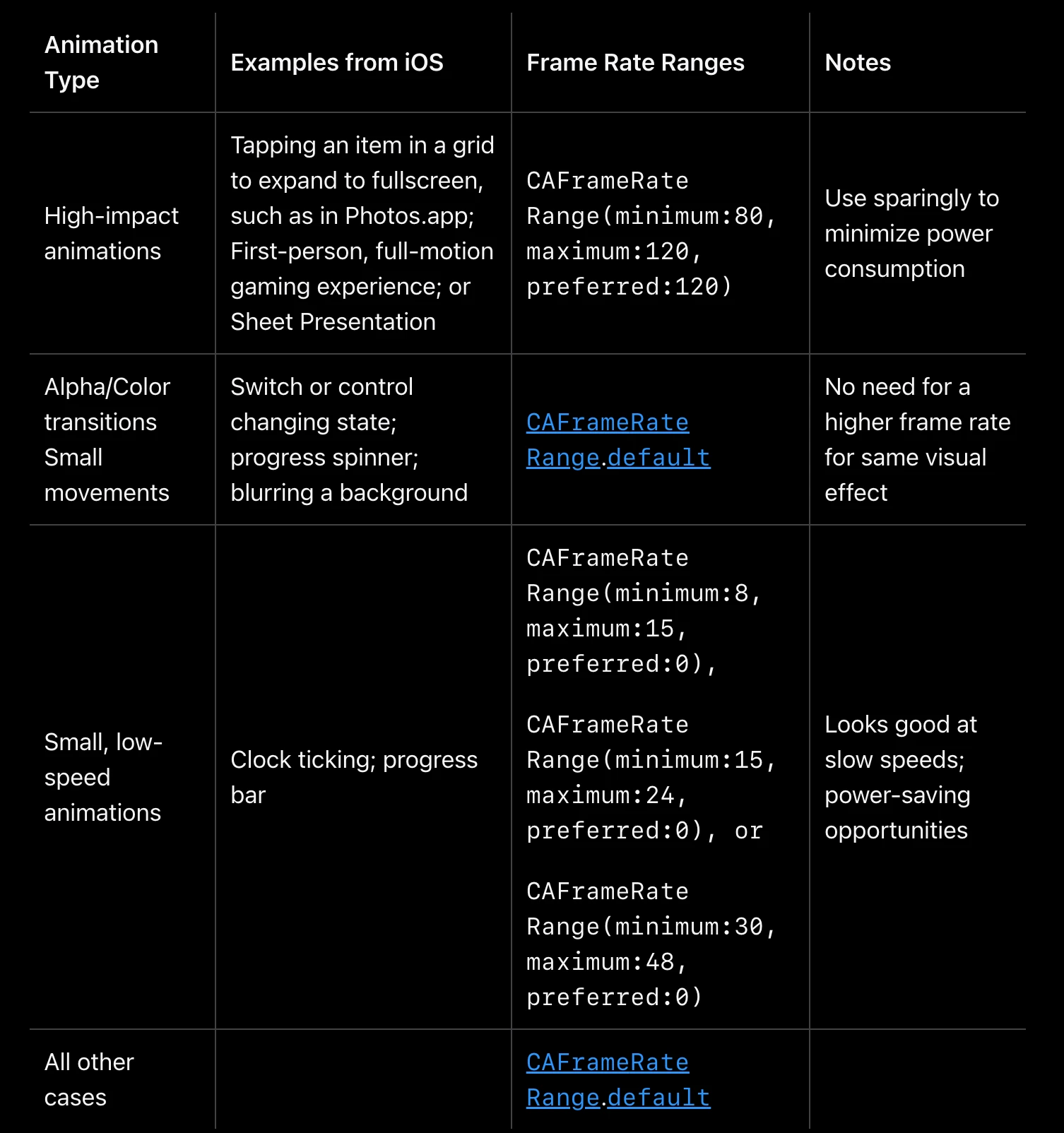
From the figure above, we can see that Apple provides very detailed ProMotion frame rate recommended configurations for different types of animation scenarios in iOS developer documentation:
High-impact animations:
- Applicable scenarios: Full screen transition (such as expanding when clicking thumbnail in Photos app), first-person games, Sheet popup display, etc.
- Recommended frame rate: 80-120Hz, preferred 120Hz (CAFrameRateRange(minimum:80, maximum:120, preferred:120))
- Usage suggestion: Use with caution, apply only in key interaction scenarios to reduce power consumption
Opacity/Color transition and micro movement:
- Applicable scenarios: Switch state change, progress indicator rotation, background blur effect, etc.
- Recommended frame rate: Use system default frame rate range (CAFrameRateRange.default)
- Usage suggestion: These animations do not need excessively high frame rate, visual effect difference is not big
Low speed small animation:
- Applicable scenarios: Clock pointer movement, slow progress bar, etc.
- Recommended frame rate: Depending on animation speed, choose 8-15Hz, 15-24Hz or 30-48Hz, etc.
- Usage suggestion: Low frame rate visual effect is good enough in these scenarios, and can significantly save power
All other cases:
- Recommended using system default frame rate
This refined frame rate management strategy not only allows the system to achieve the best balance between user experience and battery life, but also provides clear guidance for developers. Compared with simply and crudely using 120Hz globally, this targeted frame rate adjustment scheme is obviously more scientific and efficient.
Trade-off Between Power and Experience
Tests show that reducing refresh rate from 120Hz to 60Hz can save about 10-15% of power. Intelligently controlling refresh rate can significantly extend battery life while maintaining good user experience.
The main value of 120Hz lies in improving interaction smoothness and response speed, rather than always maintaining high refresh rate. A smarter approach is to dynamically adjust according to actual needs: Use high refresh rate in scenarios sensitive to user perception, and reduce refresh rate in scenarios insensitive to user perception.
Developer’s Adaptation Strategy
App developers should realize that not all content needs to be rendered at the highest frame rate. Through APIs provided by Android (such as Surface.setFrameRate()), appropriate frame rates can be specified for different content types, cooperating with the system’s adaptive refresh rate mechanism to achieve the best balance of performance and power.
In short, the future development direction of high refresh rate technology should be more intelligent and refined adaptive adjustment, rather than simply pursuing higher numbers. True technological progress is finding the best balance point between experience and energy efficiency without user perception.
Conclusion
Looking back at the development of high refresh screens in the past few years, I think 120Hz is indeed an important leap in mobile phone interaction experience. Although it brings challenges such as power consumption and development complexity, the benefits are obvious: smoother experience, lower input latency, and more natural animation effects.
For developers, tools like Perfetto allow us to see performance problems under 120Hz clearly and carry out targeted optimization. Although the budget reduction from 16ms to 8ms sounds tight, in fact mainstream processors already have enough ability to cope with this challenge. As long as UI complexity is planned reasonably and main thread blocking is avoided, smooth 120fps experience is completely achievable.
From the trend point of view, I don’t think mobile phone screen refresh rate will climb indefinitely. 120Hz may become the standard for a long time, and the future focus will be more on how to intelligently adjust refresh rate to find the best balance between experience and power consumption in different scenarios. After all, what we pursue is not high numbers, but good actual experience.
About Me && Blog
Here is a personal introduction and related links. I hope to communicate more with my peers. When three people walk together, there must be one who can be my teacher!
- Blogger Personal Introduction: Contains personal WeChat and WeChat group links.
- This Blog Content Navigation: A navigation of personal blog content.
- Personal Collection of Excellent Blog Articles - Android Performance Optimization Must-Know: Welcome everyone to recommend themselves and others (WeChat private chat is fine)
- Android Performance Optimization Knowledge Planet: Welcome to join, thank you for your support~
One person can go faster, a group of people can go further
