

This is the third article in the “Systrace Thread CPU State Analysis Tips” series. It focuses on the Sleep and Uninterruptible Sleep states in Systrace—their causes, troubleshooting, and optimization. These states are major performance inhibitors and are often difficult to diagnose without a systematic approach.
The goal of this series is to use Systrace to view the Android system from a different perspective and to learn the Framework through visualization. While reading Framework source code can be difficult to remember, seeing the flow in Systrace can lead to deeper understanding. You can find the complete Systrace Basics and Action Series here.
Table of Contents
- What are Sleep States in Linux?
- Analyzing the Sleep State
- Analyzing the Uninterruptible Sleep State
- Appendix
- About Me && Blog
- Systrace Thread CPU State Analysis Tips - Runnable
- Systrace Thread CPU State Analysis Tips - Running
- Systrace Thread CPU State Analysis Tips - Sleep and Uninterruptible Sleep
What are Sleep States in Linux?
TASK_INTERRUPTIBLE vs. TASK_UNINTERRUPTIBLE
If a thread’s state is neither Running nor Runnable, it is in a “Sleep” state (strictly speaking, there are other states like STOP or Trace, but these are rare in performance analysis).
In Linux, Sleep states are categorized into three:
- TASK_INTERRUPTIBLE
- TASK_UNINTERRUPTIBLE
- TASK_KILLABLE (equivalent to
TASK_WAKEKILL | TASK_UNINTERRUPTIBLE)
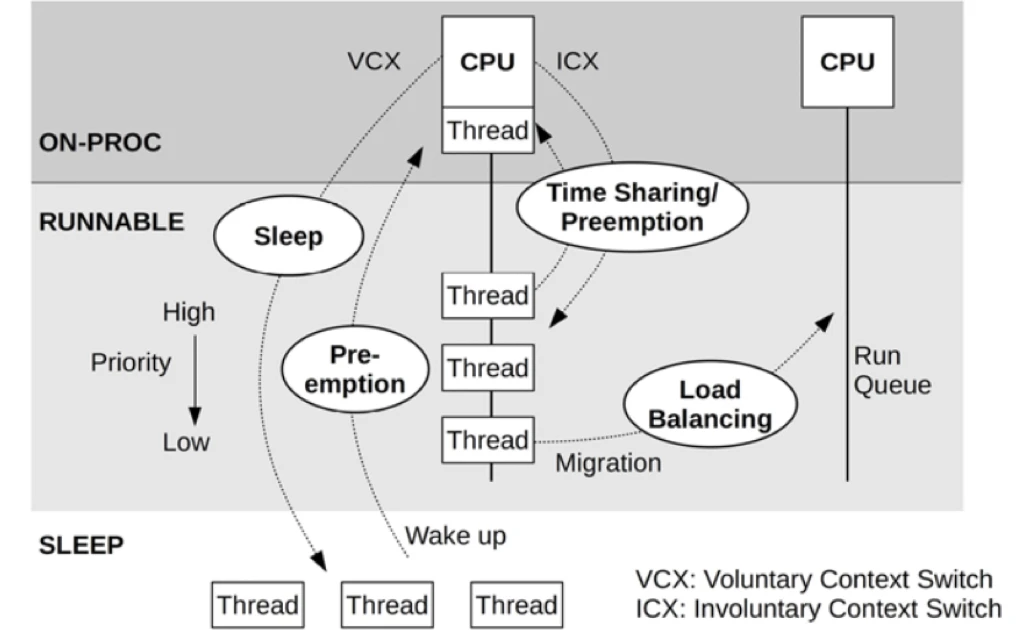
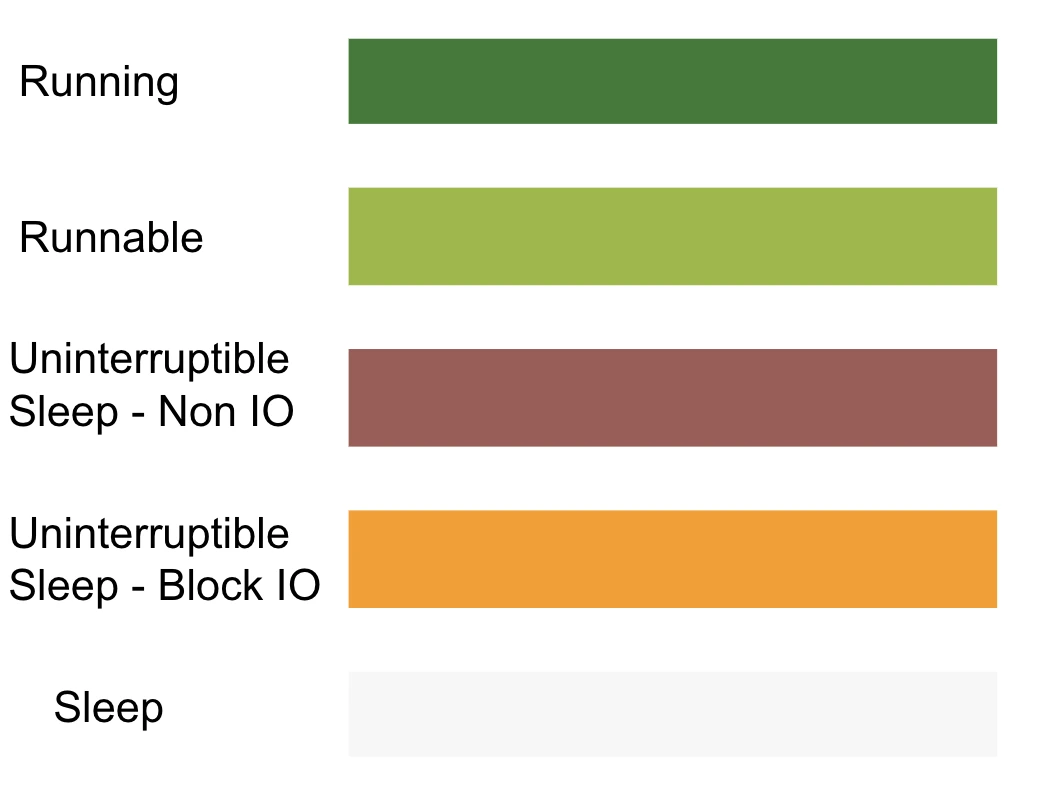
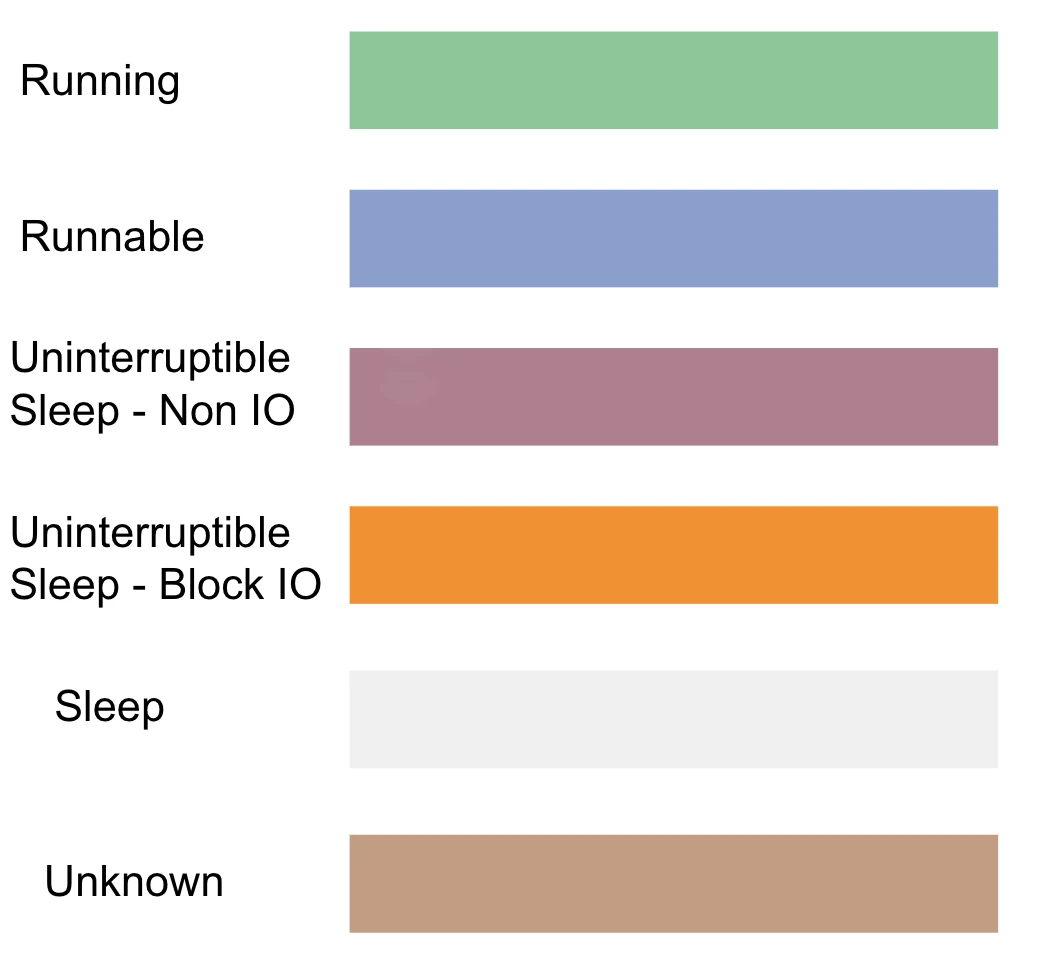
In Systrace/Perfetto, “Sleep” refers to TASK_INTERRUPTIBLE (visualized in white). “Uninterruptible Sleep” refers to TASK_UNINTERRUPTIBLE (visualized in orange).
Both indicate a sleeping state where the thread receives no CPU time slices. It only transitions to “Runnable” (blue) and then “Running” (green) when specific conditions are met.
The core difference: TASK_INTERRUPTIBLE can process signals, while TASK_UNINTERRUPTIBLE cannot—even Kill signals. Consequently, uninterruptible threads cannot be woken by any method except the specific resource they are waiting for. TASK_WAKEKILL is a variant that can process Kill signals.
Android’s Looper, Java/Native lock waits, and most app logic reside in TASK_INTERRUPTIBLE (Sleep). Looking at a Systrace, you’ll see vast white segments representing these idle periods.
The Purpose of TASK_UNINTERRUPTIBLE
Why do we need an uninterruptible state?
Interrupts come from hardware (signals to the CPU) or software (signals like softirq or Signal). A process can usually handle these at any time using its own context. However, some critical paths—like hardware driver interactions, IO waits, or networking—must not be disturbed.
Tasking a thread as uninterruptible ensures logic doesn’t enter an uncontrollable state. Similarly, the Linux kernel temporarily disables the interrupt controller during hardware scheduling or disables preemption during core scheduling to maintain control. While these states are usually brief, they can severely impact performance under system stress.
Kernel Reference: TASK_UNINTERRUPTIBLE
Typical scenarios include Swap reads, semaphores, mutex locks, and slow-path memory reclamation.
Analysis Philosophy
TASK_INTERRUPTIBLE and TASK_UNINTERRUPTIBLE are normal. However, if their cumulative percentage is high, especially on a critical path, investigation is required. Master these two points:
- Troubleshooting Methodology
- Optimization Methodology
You must identify if a sleep is active or passive. If active, is the logic sound? If passive, what is the source? This requires deep system knowledge and experience.
Note: I’ll use “Sleep” for TASK_INTERRUPTIBLE and “UninterruptibleSleep” for TASK_UNINTERRUPTIBLE to match Systrace terminology.
Initial confusion is normal and stems from system complexity. There is no single “magic” tool that explains every logic chain. Even Systrace’s wakeup_from data can be inaccurate. You must combine system theory with Trace tools to pinpoint root causes.
This article covers common types and cases. Use these diagnostic methods and source code analysis to navigate unique problems.
Visualization in Trace
Analyzing the Sleep State

Diagnostic Methods
Use wakeup from tid: *** to Find Waking Threads
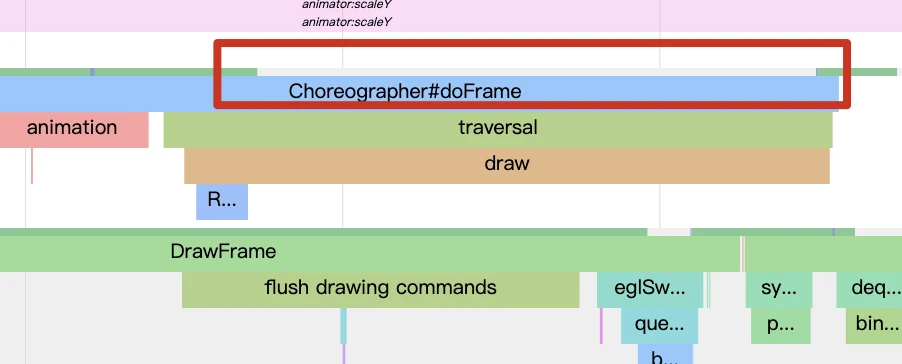
Sleep usually results from a program actively waiting for an event (like a lock), meaning there is a clear “waking source.” Figure 1 shows UIThread waiting for RenderThread. While you can infer this from code, it requires mastery of the Android graphics stack.
A simpler method is tracing wakeup from tid: ***. As discussed in the Runnable article, any thread must pass through “Runnable” before “Running.”
There are two ways to enter Runnable:
- A “Running” task is preempted.
- Another thread wakes a “Sleep” task.
In Systrace, the latter is visualized as wakeup from tid: ***, while preemption is visualized as Running Instead.
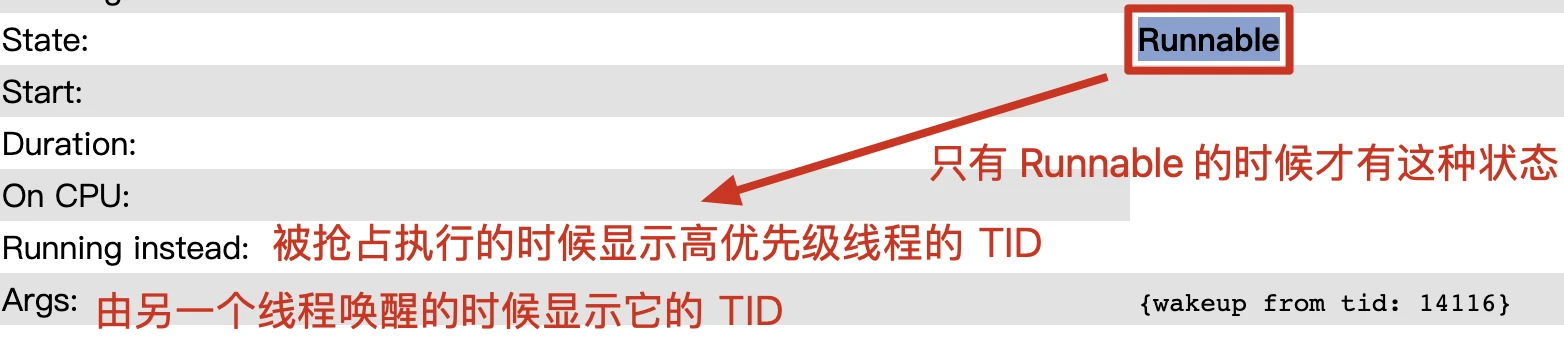
Warning: wakeup from data is tied to specific tracepoints and can sometimes be inaccurate. Verify before proceeding.
Other Methods
- Simpleperf: Reconstruct code execution flow. See Simpleperf Analysis 1: Visualizing Data with Firefox Profiler.
- Aligning Timeframes: Look for simultaneous events across different threads/processes in Systrace. This is error-prone but can provide clues.
Common Causes for Long Sleep
- Binder Operations: Enable Binder tracing to see the remote execution thread. Analyze the remote side—is it lock contention? CPU starvation?
- Java/Futex Lock Contention: Very common, especially under high load in
SystemServer. This is a side effect of Binder’s parallel or preemptive resource usage. - Active Wait: Thread waiting for another, like a semaphore. Check if the logic is essential.
- GPU Wait: Waiting for a GPU fence. Caused by heavy rendering, weak GPU, or low GPU frequency. Optimization: Increase GPU frequency, simplify Shaders, reduce resolution/texture quality, etc.
Analyzing the Uninterruptible Sleep State
Diagnostic Methods
UninterruptibleSleep is a type of sleep, so general methods apply. It has two unique attributes:
- Categorized into IOWait and Non-IOWait
- Provides a Block Reason
IOWait vs. Non-IOWait
IO Wait occurs when a program initiates an IO operation (e.g., fetching data not in PageCache). Memory is orders of magnitude faster than disk; frequent disk reads decimate performance.
Non-IO Wait typically indicates a kernel-level lock wait or a driver-enforced wait. For example, Binder driver lock contention can become a bottleneck under heavy loads.
Block Reason
Around 2015, Google’s Riley Andrews added a kernel tracepoint to record IO wait status and calling functions during UninterruptibleSleep. This powers Systrace’s IOWait and BlockReason fields. (Check your kernel if this patch is missing, as it’s not in the main Linux upstream).
1 | # Sched blocked tracepoint commit snippet |
In ftrace, it appears as:
1 | sched_blocked_reason: pid=30235 iowait=0 caller=get_user_pages_fast+0x34/0x70 |
Systrace Visualization: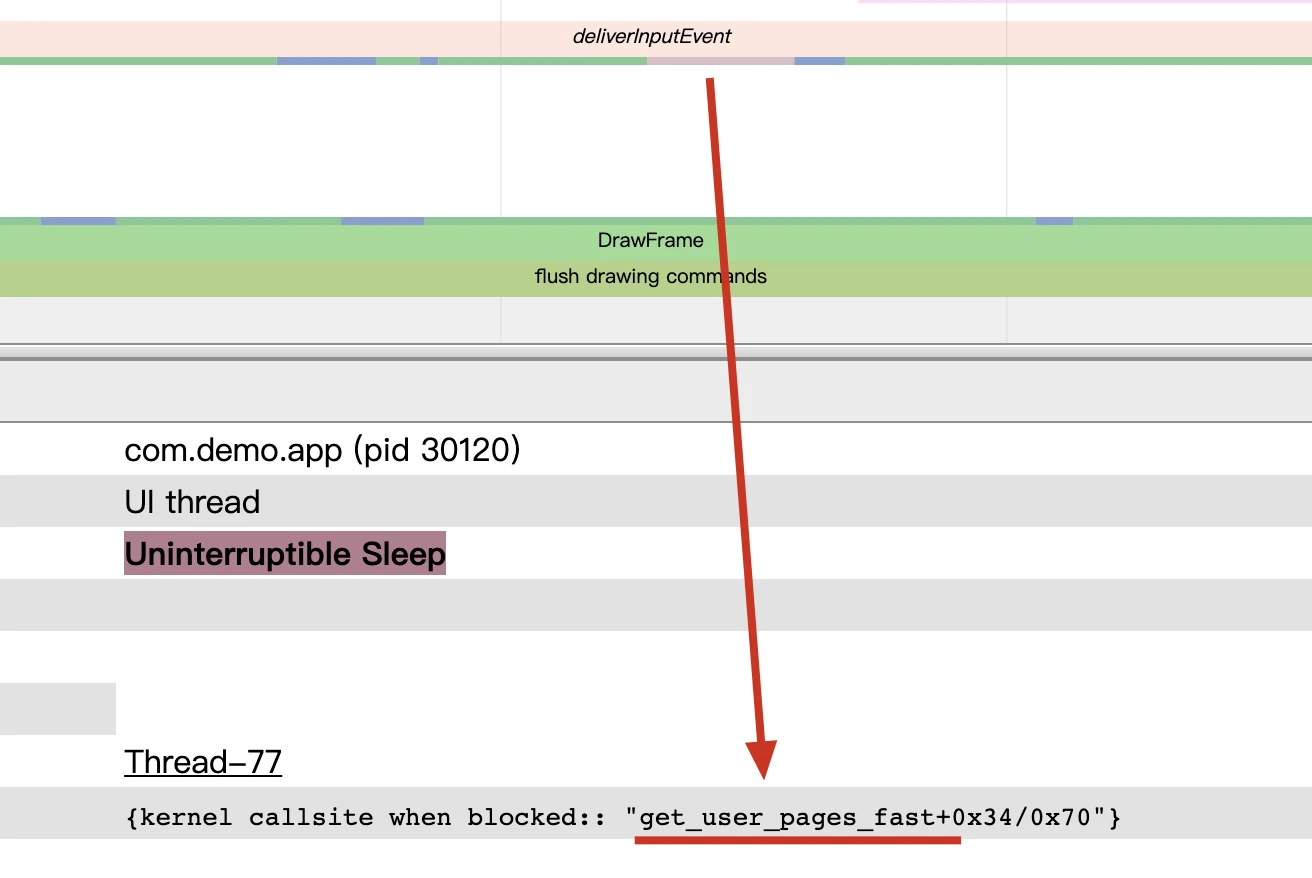
The get_user_pages_fast reason is a Linux kernel function name. To understand the wait, you must look at its implementation:
1 | /* get_user_pages_fast() implementation snippet */ |
This function tries to pin pages locklessly. If it fails, it must take the lock and follow the “slow path.” If the lock is held elsewhere, it enters UninterruptibleSleep. Use the Sleep diagnosis method to find the locker.
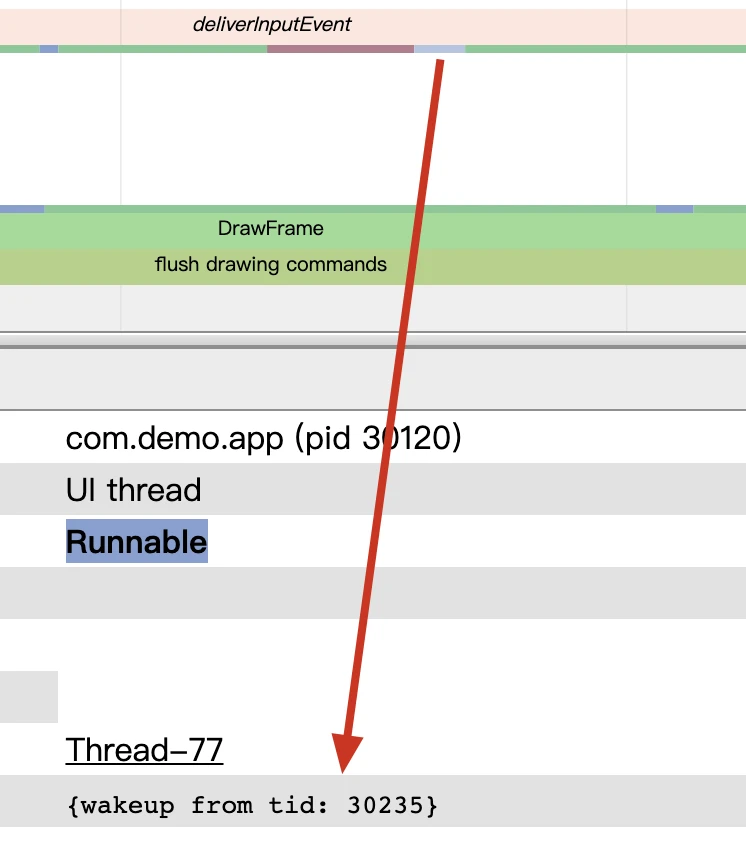
UninterruptibleSleep is complex because it involves kernel implementation. It could be a kernel bug or improper app usage. You must correlate system-wide behavior.
Common Causes for IOWait and Optimizations
1. Active IO Operations
- Frequent/large read/write operations.
- Multiple apps stressing the disk simultaneously.
- Poor hardware IO performance (check with an IO Benchmark). Causes: Fragmentation, aging, low free space (notorious on low-end devices), read/write amplification.
- File system internal overhead.
- Swap data reads.
Optimization Methods:
- Tune Readahead mechanisms.
- Use PinFile (pinning files to PageCache).
- Adjust PageCache reclamation policies.
- Optimize junk file cleanup.
2. High IO due to Low Memory
OS design treats memory as a disk cache. If memory is ample, most operations are in RAM. If memory is critically low, almost all IO hit the physical disk, causing severe lag.
The fix is ensuring enough memory or refining cache eviction algorithms.
Optimization Methods:
- Reduce IO operations on critical paths.
- Leverage Readahead.
- Group hot data to increase Readahead hit rates.
- Reduce massive memory allocations and waste.
Apps that use memory recklessly force the system to suppress them, eventually hurting their own performance.
Common Causes for Non-IOWait
- Memory Reclamation Wait: OS reclaiming pages for other apps/cache during low memory.
- Binder Wait: High frequency of Binder operations.
- Various Kernel Locks: Use the “Diagnostic Methods” above to pinpoint.
System Scheduling and UninterruptibleSleep Coupling
An interesting phenomenon occurs when a thread is in UninterruptibleSleep (kernel lock), but the holder of that lock is stuck in a “Runnable” state due to CPU scheduling. Even if the wait is for a fast operation, it appears elongated because the dependency isn’t being prioritized by the scheduler.
Resolving this requires sophisticated scheduler tuning—a true test of a manufacturer’s technical depth.
Appendix
Linux Thread State Definitions
| Thread State | Description |
|---|---|
| S | SLEEPING |
| R, R+ | RUNNABLE |
| D | UNINTR_SLEEP |
| T | STOPPED |
| t | DEBUG |
| Z | ZOMBIE |
| X | EXIT_DEAD |
| x | TASK_DEAD |
| K | WAKE_KILL |
| W | WAKING |
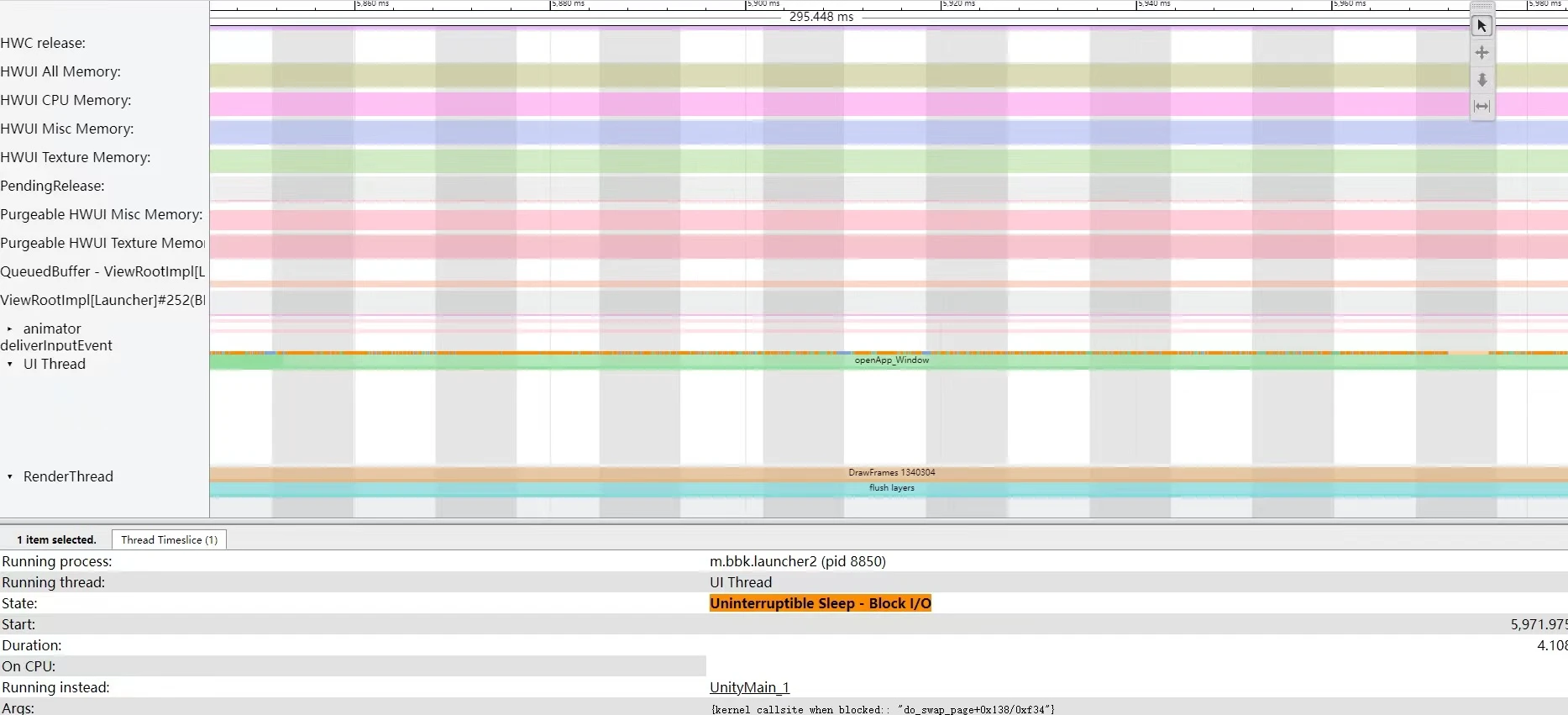
Case: Waiting for Swap Data
Case: mmap Contention Across Multiple Threads
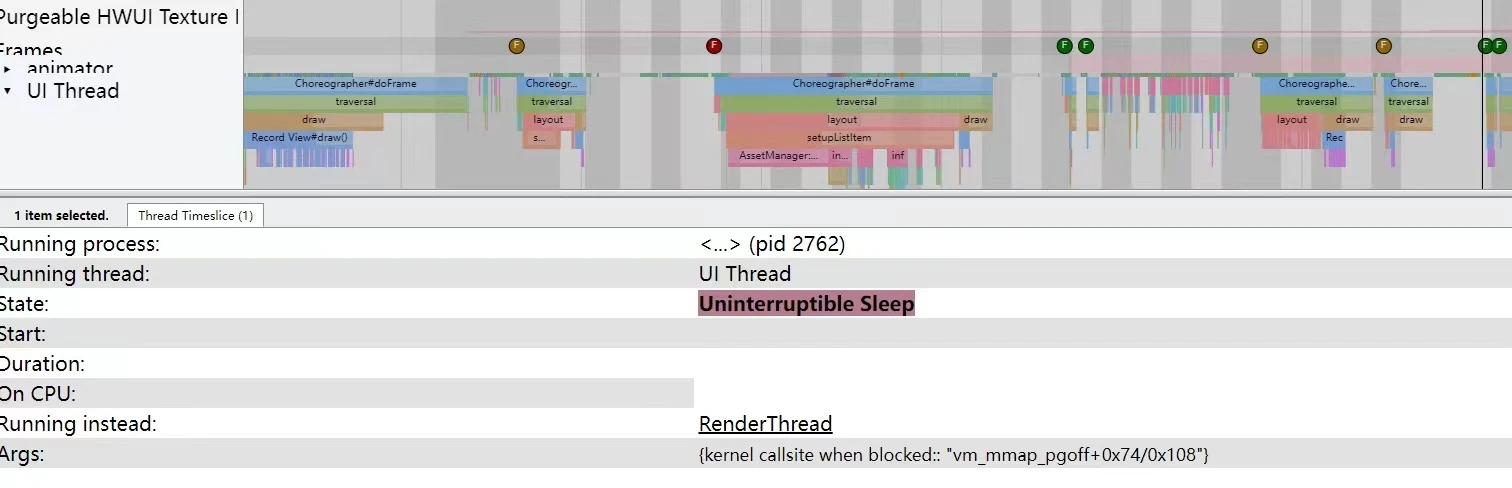
Threads sharing the same mm_struct compete for the lock during mmap() syscalls.
1 | /* mmap lock area snippet */ |
About Me && Blog
Below is my personal intro and related links. I look forward to exchanging ideas with fellow professionals. “When three walk together, one can always be my teacher!”
- Blogger Intro: Includes personal WeChat and WeChat group links.
- Blog Content Navigation: A guide for my blog content.
- Curated Excellent Blog Articles - Android Performance Optimization Must-Knows: Welcome to recommend projects/articles.
- Android Performance Optimization Knowledge Planet: Welcome to join and thank you for your support~
One walks faster alone, but a group walks further together.
