

The release of MIUI 12 brought a long-standing battle between App developers and ROM developers into the public eye, revealing the intricate details of this technical tug-of-war. As the saying goes, “While the demon rises a foot, the path rises ten feet.” ROM developers, with their higher system-level permissions, generally hold the upper hand. App developers, however, are not easily deterred, employing various “black technologies” for background persistence and cross-app wakeups. Even Google has stepped in to mediate, establishing rules to regulate behavior for both parties. This competition is arguably healthy; a total victory by either side would inevitably lead to stagnation or the loss of useful functionality.
However, the victims of this struggle are undoubtedly the consumers. If App developers succeed, phones become cluttered with persistent background processes that hog CPU and memory. Conversely, if ROM developers are too aggressive, the app experience suffer—a pain well-known to many Android developers.
As discussed later in this article, most smartphone manufacturers have developed their own strategies to handle auto-starts and associated starts. Beyond the technical struggle, there’s the issue of privacy. Baidu’s Robin Li once remarked that “Chinese people are more open about privacy and relatively less sensitive. If they can trade privacy for convenience, safety, or efficiency, they are willing to do so in many cases.” Consider the convenience of copying a phrase in WeChat and having Taobao automatically open to the corresponding item. It’s helpful, isn’t it? But do we really want every app peering into our clipboards?
Privacy should not be dismissed lightly. Technology is a double-edged sword. If privacy falls into the wrong hands, the consequences can be severe. This is exactly why the EU implemented the General Data Protection Regulation (GDPR). For example, many domestic manufacturers now differentiate their products for the EU market, disabling various data collection features to avoid massive fines. In other markets, data collection often remains unchecked.
This article does not delve into the ethics of privacy—I unconditionally support privacy protection. Instead, I will analyze the technical aspects of “Auto-start” and “Chain Wakeup” as highlighted by MIUI 12.
Note: You may not see some of these behaviors on your own phone because I am using AOSP code based on Android 10. Most domestic ROMs have already blocked these activities.
Technical Terminology Explained
First, let’s define a few key terms to establish a common understanding.
Process Startup
In Android, an app is composed of six potential parts: the Process (Mandatory), Activity (Optional), BroadcastReceiver (Optional), Service (Optional), ContentProvider (Optional), and Sub-processes (Optional).
While the last four are the well-known “Four Major Components,” they are special because each can be started independently. However, before any component starts, the system checks if its corresponding process exists. If not, the system must first launch the process before starting the component. When you tap an app icon on the home screen, you are launching an Activity. The system creates the process, starts the Activity, and then you see the interface.
Typically, auto-starts and chain wakeups avoid launching Activities because they are visible to the user. Mysteriously popping up a window from the background is a quick way to get uninstalled. Instead, these “silent” startups usually target BroadcastReceiver, Service, or ContentProvider.
Auto-start (Self-starting)
Auto-start refers to an app launching its own process without the help of other apps, typically by listening for system events (like booting or network changes) or file modifications using system mechanisms.
Associated Start (Link-starting / Chain Wakeup)
This involves one app leveraging another to launch itself. For example, opening a reading app might trigger the background launch of a writer’s assistant, a telecom app, or a language learning tool.
Startup Blocking
Also known as “Wakeup Interception,” ROM developers insert logic at the component startup point. Only components meeting specific criteria are allowed to launch their process. If the criteria aren’t met, the request is discarded, effectively blocking the startup.
This is a delicate task. ROM developers must judge work states and the “reasonableness” of a launch. Incorrect blocking can break legitimate user flows—for instance, if a user attempts to pay via Alipay from within another app but the ROM blocks Alipay’s payment component, the resulting UX failure will surely frustrate the user.
Analysis Methods
Monkey
To analyze app startups, you need to install a large number of apps and run Monkey to force most processes into action. The command I used is:
1 | adb shell monkey --kill-process-after-error --ignore-security-exceptions --ignore-crashes --pct-appswitch 90 --pct-touch 10 --throttle 10000 --ignore-timeouts --ignore-native-crashes 100000000 |
EventLog
EventLog provides a truthful record of process starts and deaths. I use the following filter:
1 | adb logcat -b events | egrep "am_proc_died|am_proc_start" |
Dumpsys
dumpsys activity is invaluable for analyzing the details of a process’s components.
1 | adb shell dumpsys activity |
Technical Analysis of Auto-starts
Auto-starts rely on system mechanisms to wake up a process. Common events include booting, network changes, and media library scans.
Boot Completed
After a phone restarts, the system broadcasts a “Boot Completed” signal to all apps registered for it. These apps can then wake themselves up to start background tasks (or launch even more processes). The broadcast is:
1 | android.intent.action.BOOT_COMPLETED |
Apps use this to continue tasks like photo backups, contact syncing, checking for updates, or pushing news. This is a primary method for auto-starting.
Case Study: Tencent News
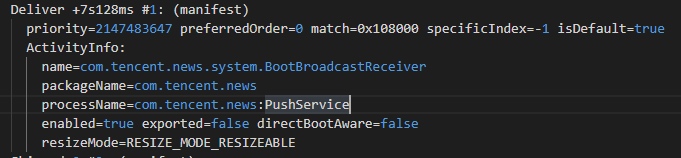
In the logs, com.tencent.news.system.BootBroadcastReceiver received the BOOT_COMPLETED broadcast and spent 7 seconds processing it. To do this, the system first had to launch the com.tencent.news process to execute the onReceive method. This is a classic auto-start case.
Network Changes
This includes connecting/disconnecting to the internet or switching between Wi-Fi and mobile data. The broadcast is:
1 | android.net.conn.CONNECTIVITY_CHANGE |
Apps listen to this to adjust behavior—for example, a live streaming app might warn a user if they switch from Wi-Fi to 4G to prevent data overages. However, it is also frequently used for silent auto-starts.
Examples
Here are some broadcast receivers triggered by network changes (there were over 200 in my test):
- DingTalk (
com.alibaba.android.rimet):com.xiaomi.push.service.receivers.NetworkStatusReceiver - Learning Strong Nation (
cn.xuexi.android):com.xiaomi.push.service.receivers.NetworkStatusReceiver - Weibo (
com.sina.weibo):com.xiaomi.push.service.receivers.NetworkStatusReceiver - DiDi (
com.sdu.didi.psnger):com.didi.sdk.push.PushNetReceiver - Inke (
com.meelive.ingkee):com.network_optimization.NetWorkStateReceiver
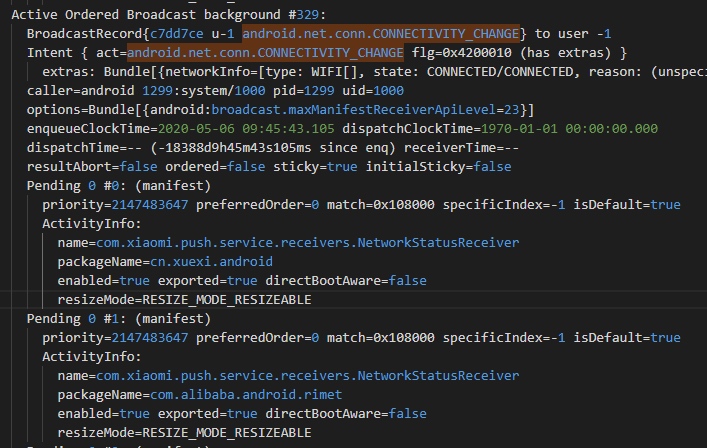
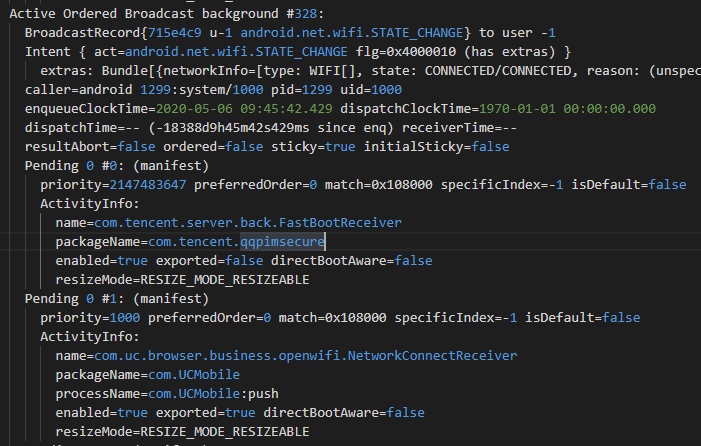
Other similar broadcasts include android.net.wifi.STATE_CHANGE:
Media Library Scanning
The system notifies apps when files change or storage is mounted.
1 | android.intent.action.MEDIA_SCANNER_STARTED |
Case Study: JD Finance
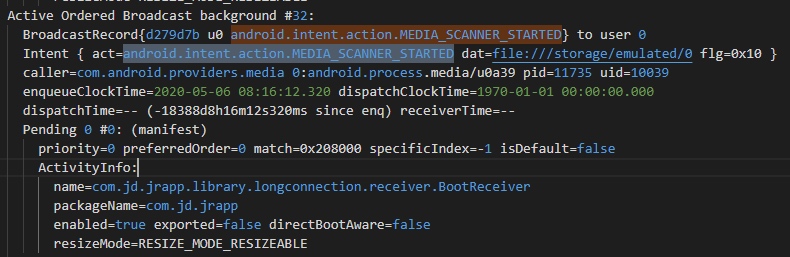
com.jd.jrapp.library.longconnection.receiver.BootReceiver listens for MEDIA_SCANNER_STARTED to trigger a process launch.
Third-Party SDKs (e.g., GeTui)
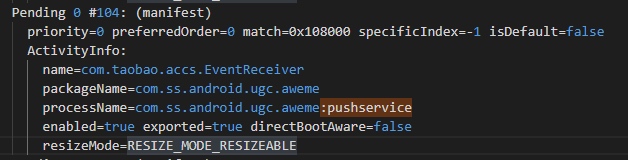
GeTui is a popular push notification SDK. It integrates multiple auto-start methods, including BOOT_COMPLETED, CONNECTIVITY_CHANGE, and USER_PRESENT. Developers often customize a service inheriting from com.igexin.sdk.PushService. Using :pushservice as a process name suffix is a common indicator.
Looking at GeTui’s configuration documentation:
1 | <service |
Technical Analysis of Associated Starts (Chain Wakeups)
Associated starts occur when multiple apps use the same SDK. When you launch one app, that SDK can then launch other apps that use it. This happens within large app families (like those of BAT) or through shared third-party SDKs like JPush.
Let’s look at an EventLog entry:
1 | [0,19428,10195,com.qq.reader,service,{com.qq.reader/cn.jpush.android.service.DaemonService}] |
- Process Started:
com.qq.reader(QQ Reader) - PID: 19428
- Component:
cn.jpush.android.service.DaemonService - Type: Service
Case Study: Qidian Launching QQ Reader via JPush
After forcing QQ Reader to stop, I observed the EventLog. QQ Reader’s process was awakened by the launch of the DaemonService component. While EventLog doesn’t show who requested the launch, dumpsys activity reveals the caller in the ServiceRecord‘s Connections field: it was com.qidian.QDReader:pushcore.


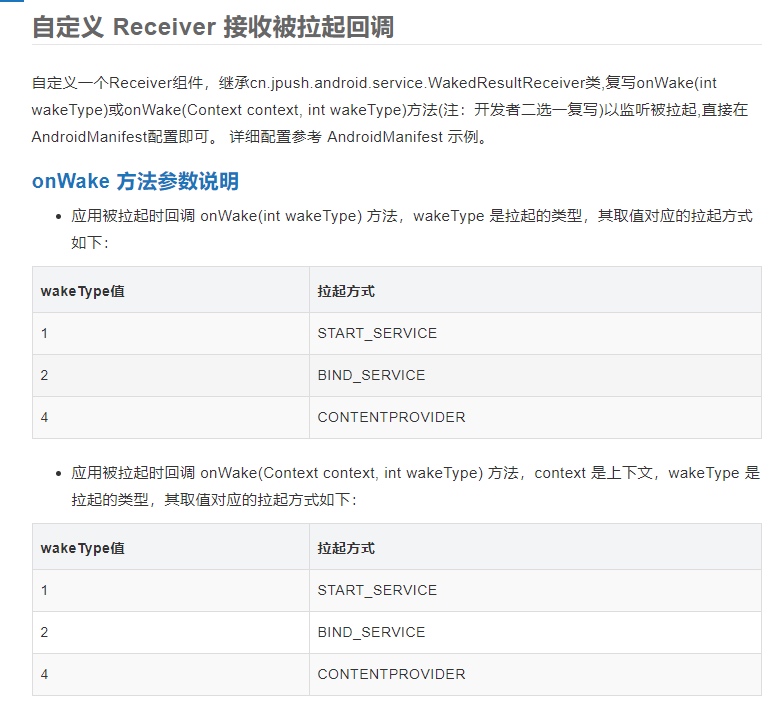
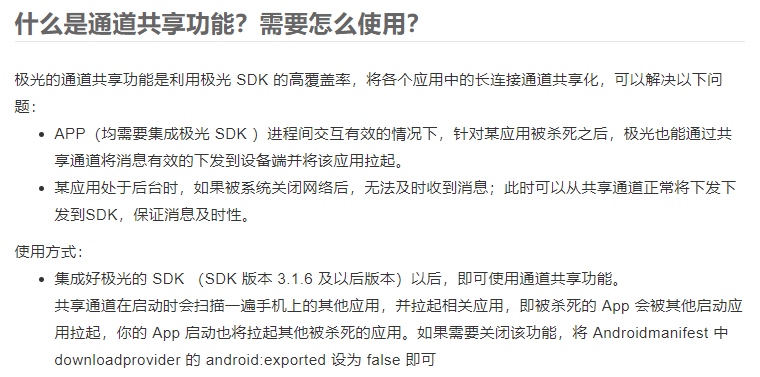
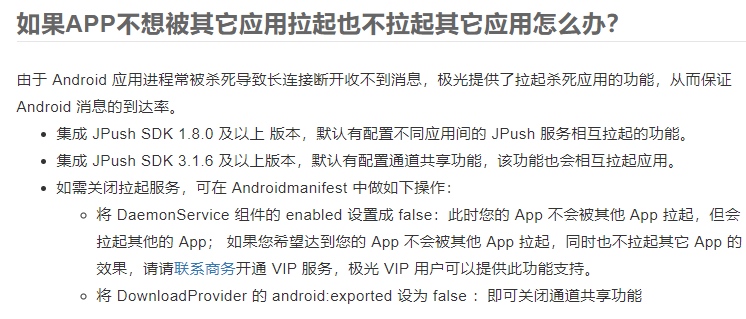
Xiaomi’s MIUI 12 would display this as: “Qidian Reading launched QQ Reader at 8:48 AM.” JPush’s official documentation explicitly provides features for waking up other apps and being awakened by them.
JPush Wakeup Configuration
OEM Responses
Process management is the most contested area in Android. MIUI chose to show this battle to users, but other manufacturers do the same quietly behind the scenes. Without these controls, phones would be unusable. On my test Pixel, processes are constantly killed by the Low Memory Killer (LMK) due to low RAM, only to be immediately restarted, draining the battery and causing severe lag.
The official documentation for push SDKs often lists the settings paths for various OEMs. It’s worth checking these lists to remove apps from white-lists that you don’t want running in the background.
GeTui White-list Configurations
EMUI OS (Huawei)
- Auto-start Management: Apps must be added to the “Auto-start” list, or they won’t launch after being killed or at boot.
- Background App Protection: Apps must be manually added to this list to survive device sleep.
- Notification Management: Settings include Prompt, Allow, and Prohibit.
Flyme OS (Meizu)
- Auto-start Management: Requires manual inclusion in the list.
- Notification Push: Disabling notifications hides all messages.
Funtouch OS (VIVO)
- Auto-start Management: Managed via “iManager.” Force-killing an app manually prevents auto-restart even if it’s on the list.
Color OS (OPPO)
- Frozen App Management: Apps must be added to “Pure Background” to receive messages during lock screen.
- Auto-start Management: Requires inclusion in the list and “locking” the process in the recent apps/running view.
MIUI OS (Xiaomi)
- Auto-start Management: Requires manual inclusion.
- Battery Saver: Must be disabled for the app, or network access will be restricted after a few minutes in the background.
About Me && Blog
Below are my personal details and links. I look forward to connecting and sharing knowledge with fellow developers!
- About Me: Includes my WeChat and WeChat group links.
- Blog Navigation: A guide to the content on this blog.
- Curated Android Performance Articles: A collection of must-read performance optimization articles. Self-nominations/recommendations are welcome!
- Android Performance Knowledge Planet: Join our community for more insights.
“If you want to go fast, go alone. If you want to go far, go together.”
