

This is the sixth article in the Systrace series, primarily providing a brief introduction to Input in Systrace. It covers the Input workflow, how Input information is represented in Systrace, and how to combine Input info to analyze related performance issues.
The purpose of this series is to view the overall operation of the Android system from a different perspective using Systrace, while also providing an alternative angle for learning the Framework. Perhaps you’ve read many articles about the Framework but can never remember the code, or you’re unclear about the execution flow. Maybe from Systrace’s graphical perspective, you can gain a deeper understanding.
Table of Contents
- Series Article Index
- Main Content
- Input in Systrace
- InputDown Event Workflow in SystemServer
- InputDown Event Workflow in App
- Key Knowledge Points and Processes
- Input Refresh and Vsync
- Input Debug Information
- References
- Attachments
- Other Addresses
- About Me && Blog
Series Article Index
- Introduction to Systrace
- Systrace Basics - Prerequisites for Systrace
- Systrace Basics - Why 60 fps?
- Android Systrace Basics - SystemServer Explained
- Systrace Basics - SurfaceFlinger Explained
- Systrace Basics - Input Explained
- Systrace Basics - Vsync Explained
- Systrace Basics - Vsync-App: Detailed Explanation of Choreographer-Based Rendering Mechanism
- Systrace Basics - MainThread and RenderThread Explained
- Systrace Basics - Binder and Lock Contention Explained
- Systrace Basics - Triple Buffer Explained
- Systrace Basics - CPU Info Explained
- Systrace Smoothness in Action 1: Understanding Jank Principles
- Systrace Smoothness in Action 2: Case Analysis - MIUI Launcher Scroll Jank Analysis
- Systrace Smoothness in Action 3: FAQs During Jank Analysis
- Systrace Responsiveness in Action 1: Understanding Responsiveness Principles
- Systrace Responsiveness in Action 2: Responsiveness Analysis - Using App Startup as an Example
- Systrace Responsiveness in Action 3: Extended Knowledge on Responsiveness
- Systrace Thread CPU State Analysis Tips - Runnable
- Systrace Thread CPU State Analysis Tips - Running
- Systrace Thread CPU State Analysis Tips - Sleep and Uninterruptible Sleep
Main Content
In the article Detailed Explanation of Android Rendering Mechanism Based on Choreographer, I mentioned that the execution of an Android App’s main thread is essentially driven by Messages. These Messages can be looping animations, timed tasks, or wake-ups from other threads. However, the most common is the Input Message. Input here refers to the category under InputReader, which includes not only touch events (Down, Up, Move) but also Key events (Home Key, Back Key). In this article, we focus on touch events.
Because the Android system has added Trace points along the Input chain, and these are quite comprehensive, some manufacturers might add their own. However, we’ll focus on standard Trace points here to ensure the information remains consistent across different devices.
Input holds a vital position in Android. Most app scrolling and transitions are driven by Input events. I will eventually write a dedicated article on Android’s Input-based operation mechanism. Here, we look at Input from the perspective of Systrace. Before diving into the flow, keep this general handling process in mind:
- The touch screen scans every few milliseconds; if a touch event occurs, it reports it to the corresponding driver.
InputReaderreads the touch event and hands it toInputDispatcherfor dispatching.InputDispatchersends the touch event to the App that registered for Input events.- Once the App receives the event, it performs event distribution. If the App’s UI changes during this process, it requests Vsync, leading to a frame redraw.
Also, when viewing Systrace, remember that time flows from left to right. A vertical line drawn on the Systrace means events to the left always happen before those to the right—this is a cornerstone of our analysis. I hope that after reading these Systrace-based analyses, you’ll have a 3D, graphical flowchart in your mind to quickly locate where your code execution stands.
Input in Systrace
Below is an overview diagram using launcher scrolling as an example (launcher scrolling includes one Input_Down event + several Input_Move events + one Input_Up event, all represented in Systrace, serving as a key entry point for analysis). The main modules involved are SystemServer and the App. Blue identifies event flow information, while red represents auxiliary data.
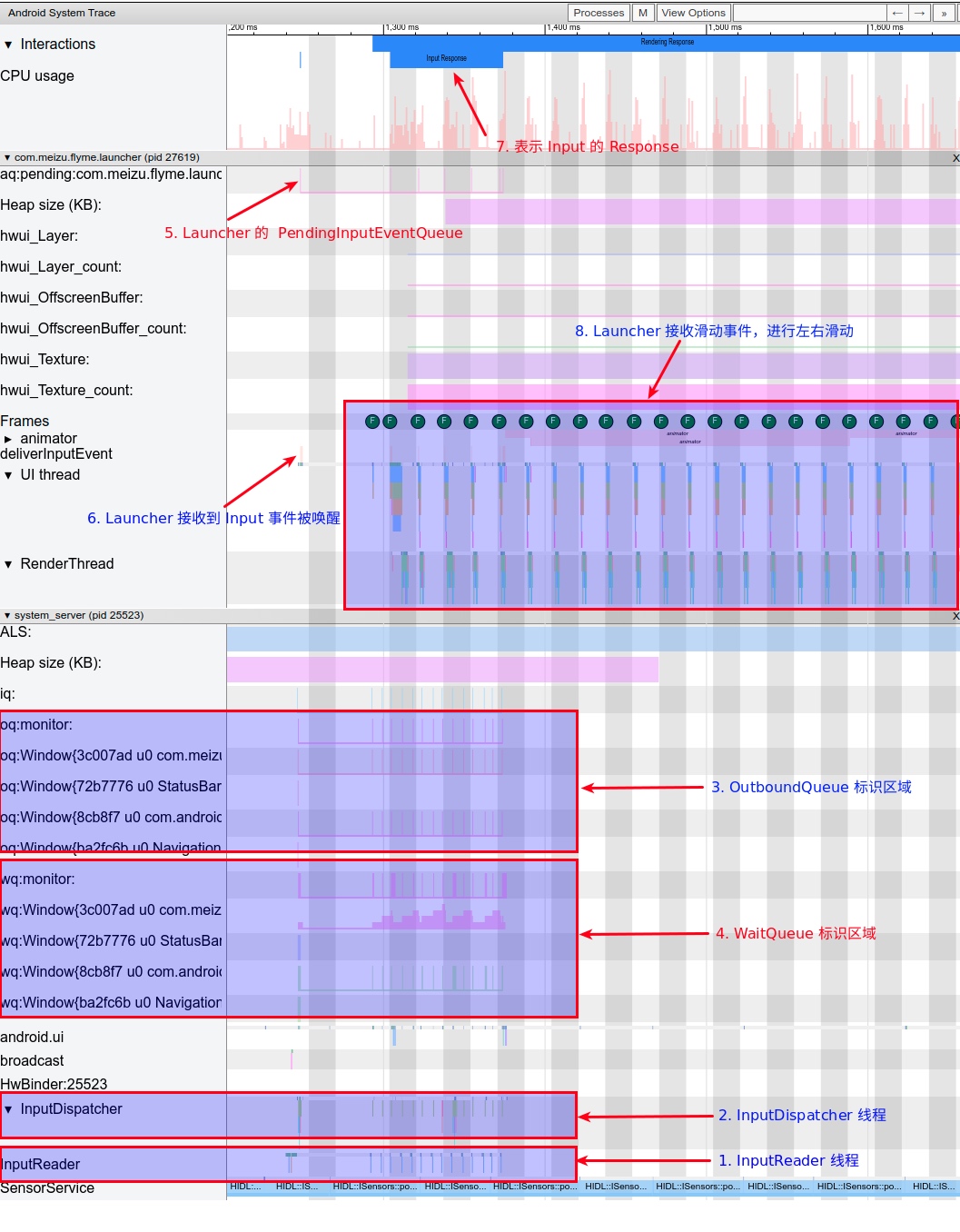
InputReader and InputDispatcher are two Native threads running within SystemServer, responsible for reading and dispatching Input events. Our Systrace analysis begins here. Below is a brief explanation of the marked numbers in the diagram:
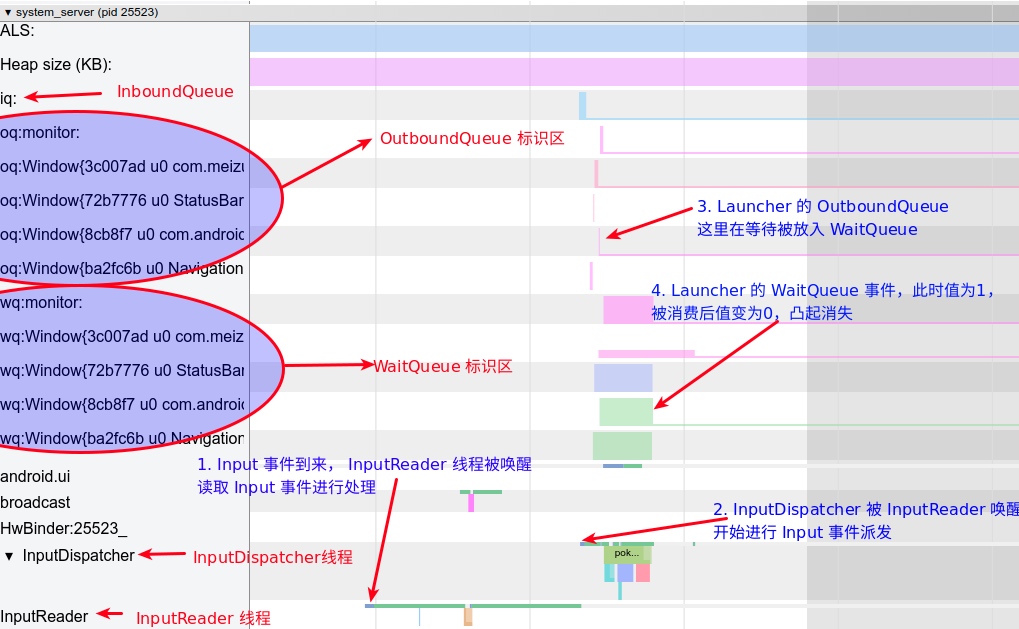
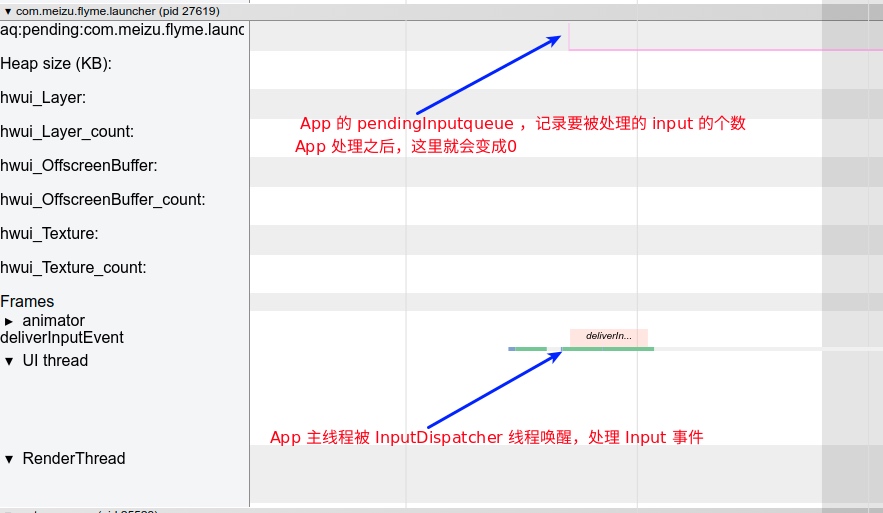
InputReader: Reads Input events fromEventHuband passes them toInputDispatcher.InputDispatcher: Processes events received fromInputReader(packaging and dispatching them to the corresponding app).OutboundQueue: Contains events about to be dispatched to the correspondingAppConnection.WaitQueue: Records events dispatched to anAppConnectionthat the App has not yet acknowledged as successfully processed.PendingInputEventQueue: Records Input events that the App needs to process (now within the application process).deliverInputEvent: Marks the App UI Thread being woken up by an Input event.InputResponse: Marks the Input event region, covering the processing stages ofInput_Down,Input_Move(multiple), andInput_Up.- App Response to Input Event: This shows the scrolling and subsequent release (fling) actions. Launcher updates the screen as the finger moves and triggers Fling after release; the entire flow is visible in Systrace.
Next, we’ll detail the workflow for the first Input_Down event. Processing for Move and Up events is similar (with minor differences that don’t affect the big picture).
InputDown Event Workflow in SystemServer
Magnifying the SystemServer section reveals the workflow (blue). Launcher scrolling includes Input_Down + several Input_Move + Input_Up; we are looking at the Input_Down event here.
InputDown Event Workflow in App
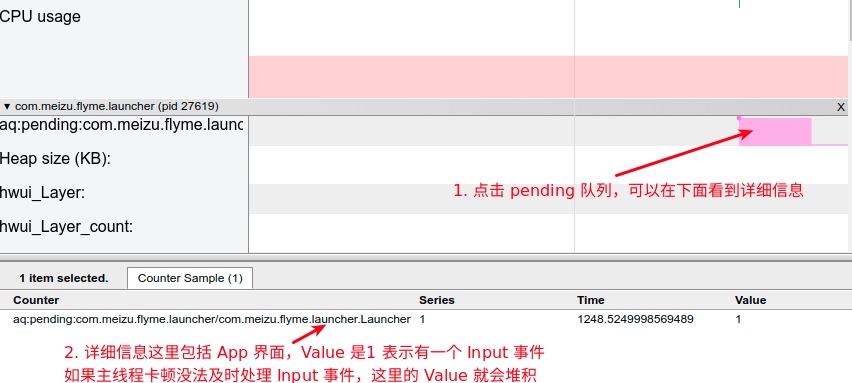
Upon receiving an Input event, the App may process it immediately (if no Vsync is present) or wait for a Vsync signal. Here, the Input_Down event directly wakes the main thread for processing. Its Systrace is relatively simple: an Input event queue at the top, with the main thread handling it.
App’s Pending Queue
Main Thread Processing Input Events
The main thread processing Input events is a familiar concept. From the call stack below, we see the Input event passed to ViewRootImpl, eventually reaching DecorView, followed by the familiar Input event distribution mechanism.

Key Knowledge Points and Processes
Based on the Systrace above, the basic Input event flow is as follows:
InputReaderreads the Input event.InputReaderplaces the read Input event into theInboundQueue.InputDispatchertakes the event fromInboundQueueand dispatches it to theOutBoundQueueof various Apps (connections).- Simultaneously, the event is recorded in each App’s
WaitQueue. - The App receives the Input event, records it in
PendingInputEventQueue, and handles its distribution. - After processing, the App calls back
InputManagerServiceto remove the corresponding Input from theWaitQueue.
Through this process, a single Input event is consumed (this is the normal case; many exceptions and details exist). This section explains several important knowledge points from this critical flow (some processes and diagrams reference Gityuan’s blog, linked in the References section).
InputReader
InputReader is a Native thread running in the SystemServer process. Its core functions are reading events from EventHub, processing them, and sending them to InputDispatcher.
The InputReader Loop flow is:
getEvents: Reads events fromEventHub(monitoring/dev/input), places them intomEventBuffer(size 256), and convertsinput_eventtoRawEvent.processEventsLocked: Processes events, convertingRawEvent->NotifyKeyArgs(or otherNotifyArgs).QueuedListener->flush: Sends events to theInputDispatcherthread, convertingNotifyKeyArgs->KeyEntry(orEventEntry).
The core loopOnce processing flow is: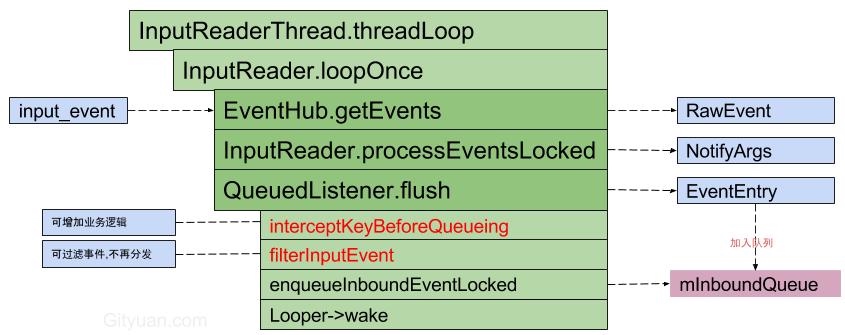
Logic of InputReader::loopOnce:
1 | void InputReader::loopOnce() { |
InputDispatcher
After InputReader calls mQueuedListener->flush, Input events are added to InputDispatcher‘s mInboundQueue, waking it up. Systrace shows the InputDispatch thread being woken by InputReader.
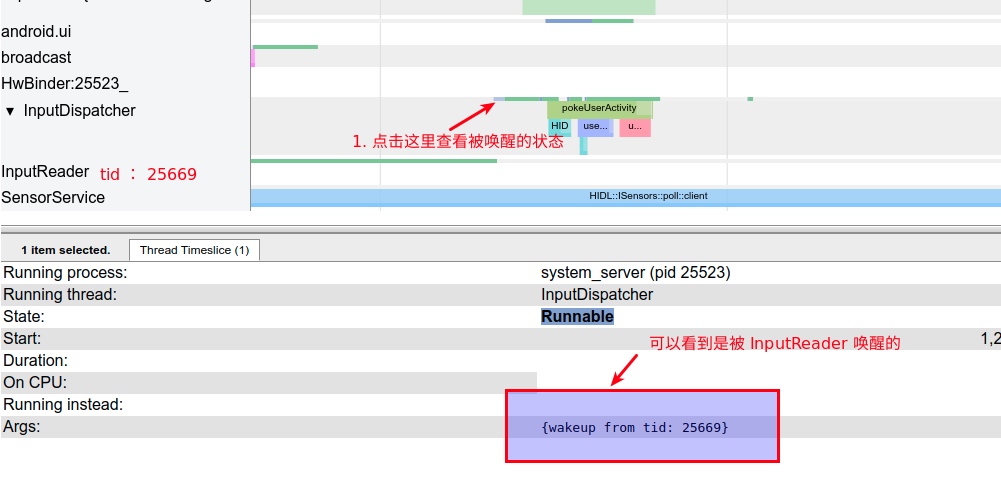
Core logic of InputDispatcher:
dispatchOnceInnerLocked(): TakesEventEntryfrommInboundQueue. The start time of this method (currentTime) becomes thedeliveryTimefor subsequentdispatchEntry.dispatchKeyLocked(): May adddoInterceptKeyBeforeDispatchingLockedInterruptibleunder certain conditions.enqueueDispatchEntryLocked(): GeneratesDispatchEntryand adds it to the connection’soutboundqueue.startDispatchCycleLocked(): TakesDispatchEntryfromoutboundQueueand moves it to the connection’swaitQueue.InputChannel.sendMessage: Sends the message to the remote process via socket.runCommandsLockedInterruptible(): Iteratively processes all commands inmCommandQueue(added viapostCommandLocked()).
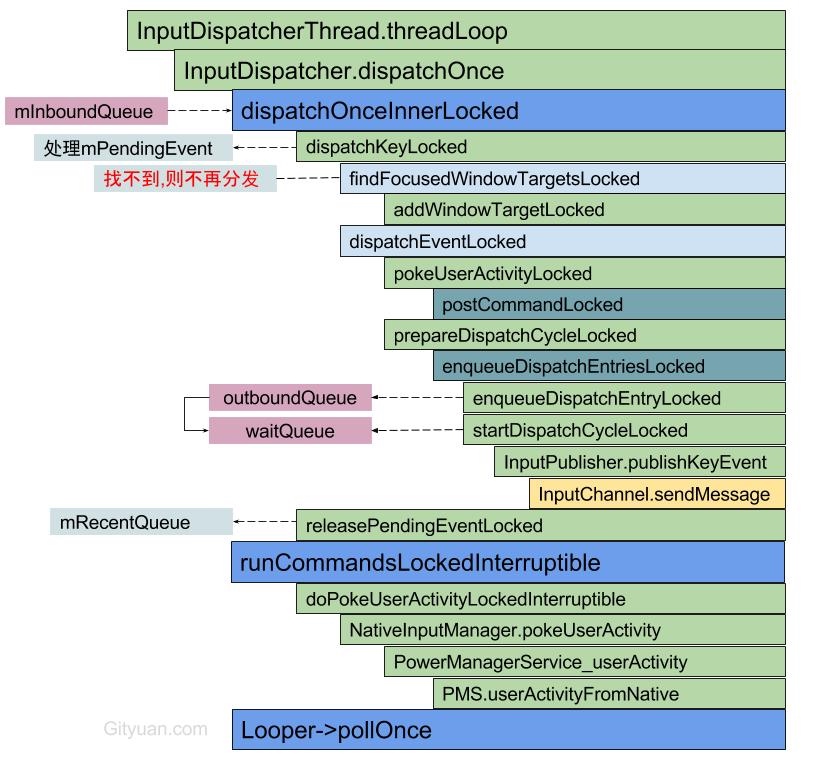
Core processing in dispatchOnceInnerLocked:
1 | void InputDispatcher::dispatchOnceInnerLocked(nsecs_t* nextWakeupTime) { |
InboundQueue
When InputDispatcher executes notifyKey, it encapsulates the Input event and places it in InboundQueue. InputDispatcher then retrieves events from here during its processing loop.
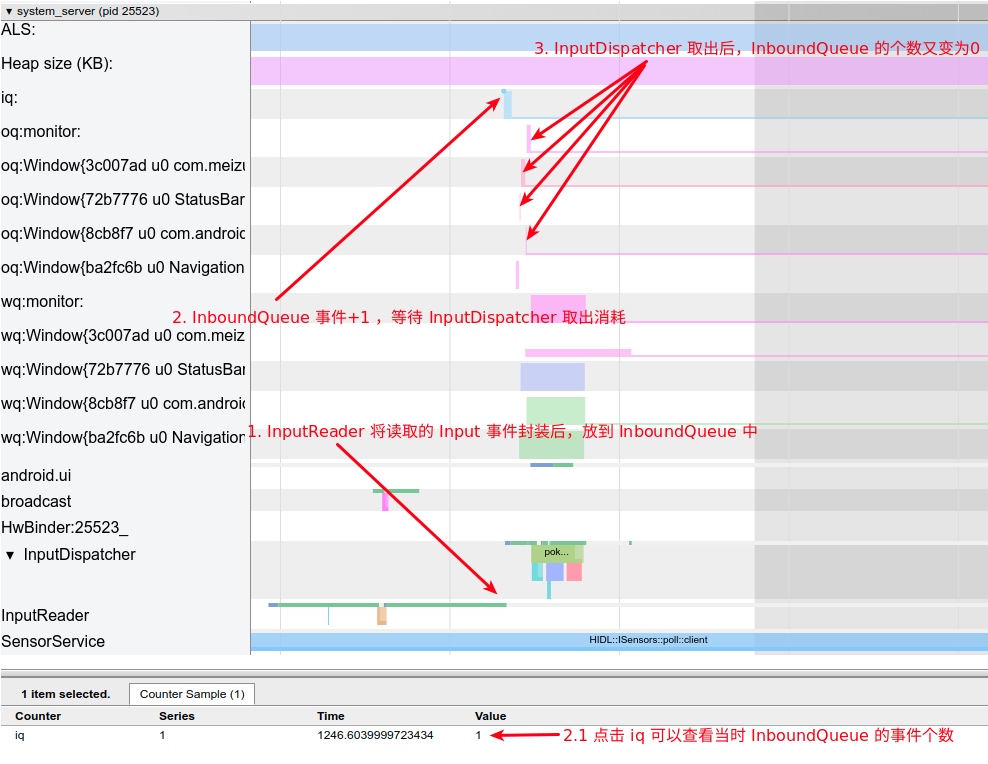
OutboundQueue
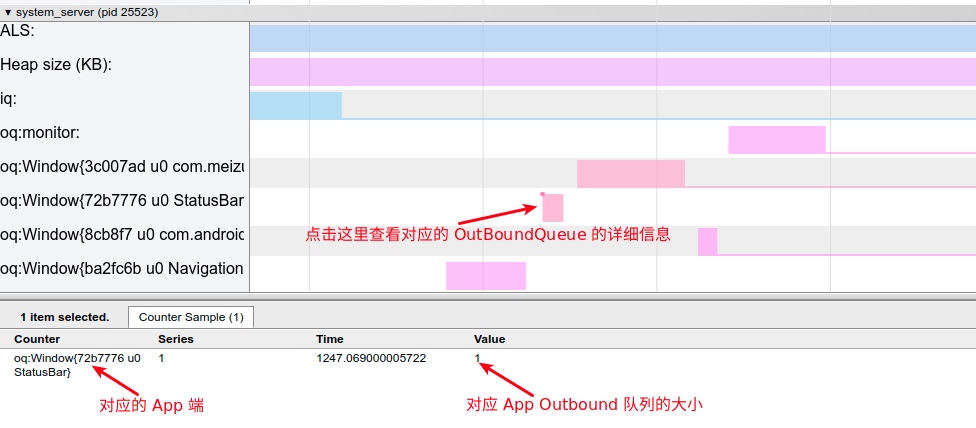
“Outbound” refers to events leaving for App processing. Each App (Connection) has an OutboundQueue. Events enter InboundQueue and are then dispatched by InputDispatcher to each App’s OutboundQueue.
WaitQueue
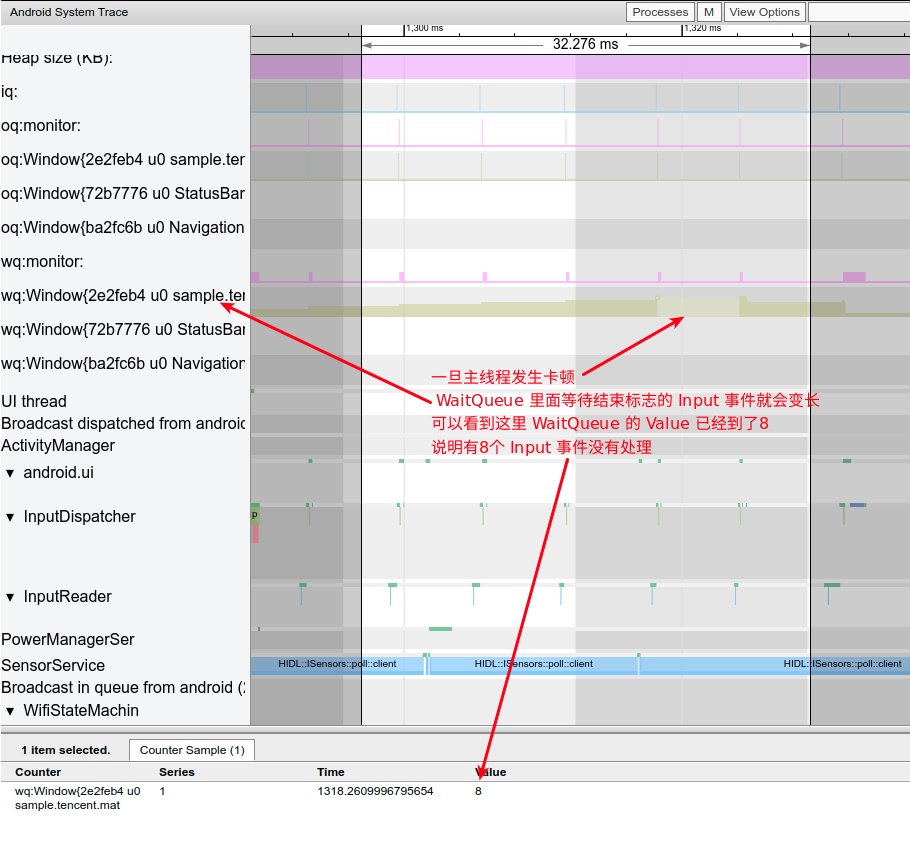
Once InputDispatcher dispatches an event, it moves the DispatchEntry from outboundQueue to WaitQueue. When the published event is “finished,” InputManagerService receives a reply and removes the event from WaitQueue. In Systrace, you’ll see the App’s WaitQueue length decrease.
If the main thread is janky, Input events aren’t consumed in time, which manifests in the WaitQueue:
Overall Logic
Diagram from Gityuan’s Blog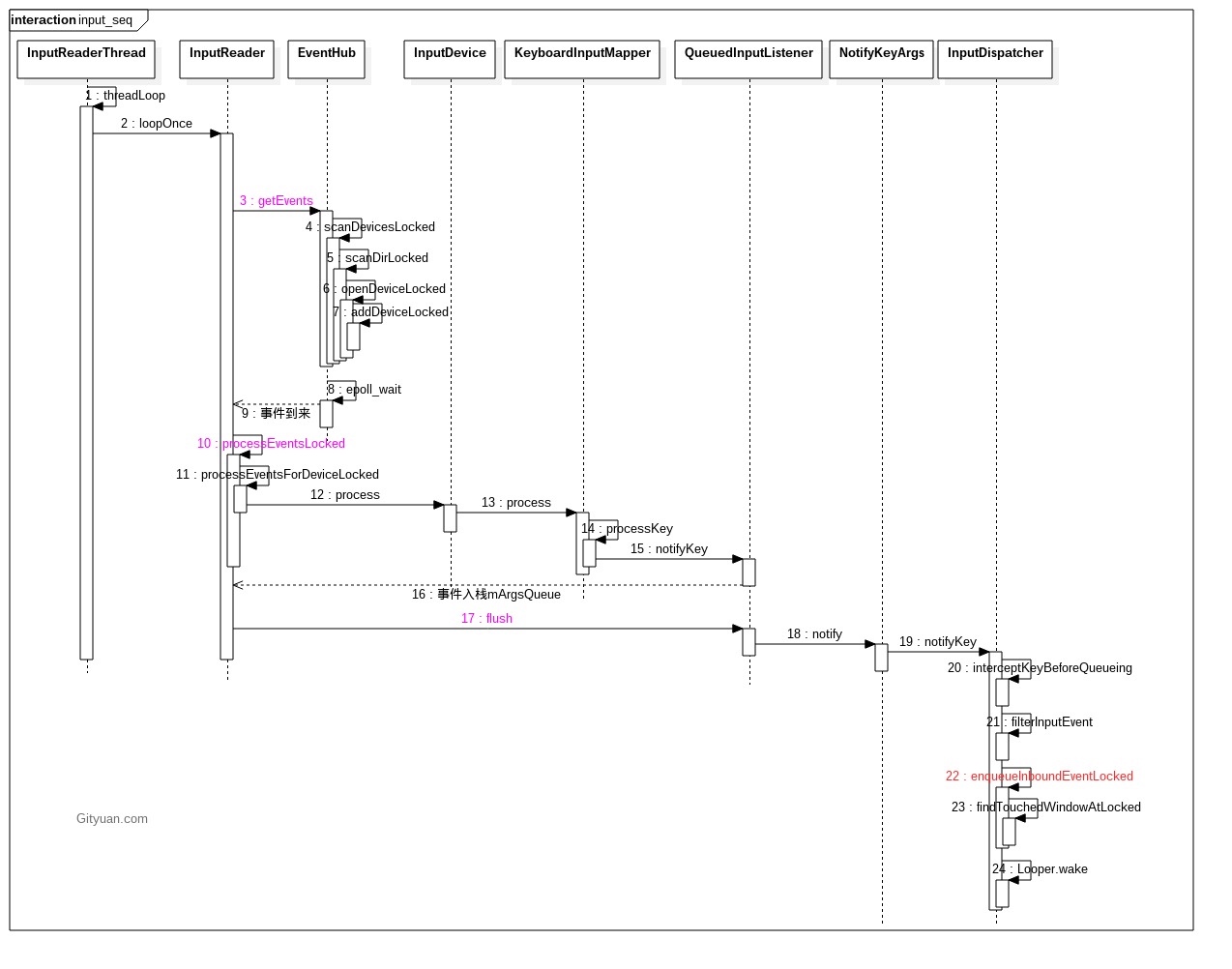
Input Refresh and Vsync
Input refresh depends on touch screen sampling. Many screens now use 120Hz or 160Hz, sampling every 8ms or 6.25ms. Let’s see how this looks in Systrace:
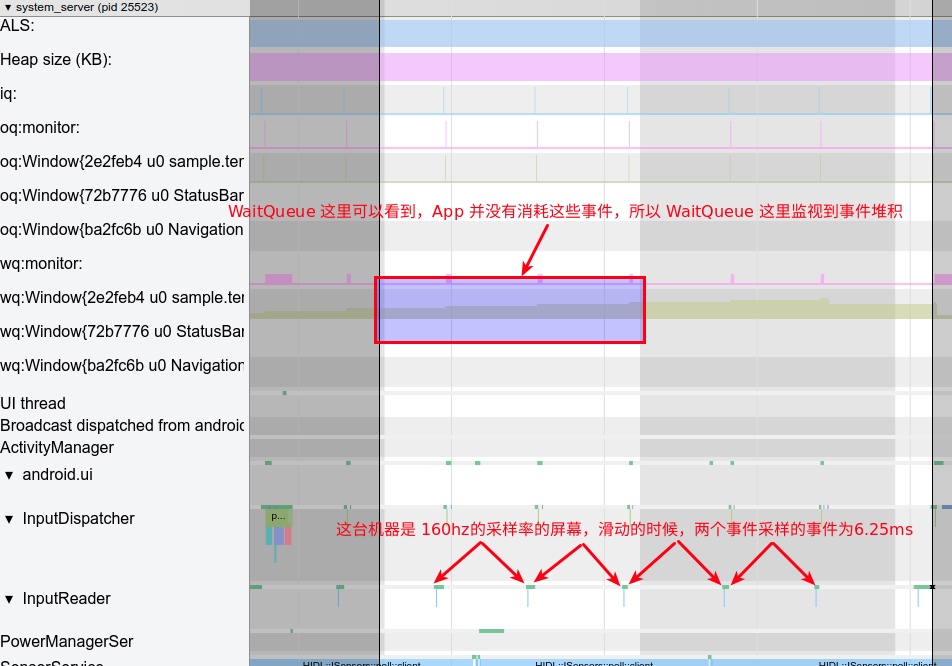
In the diagram, InputReader reads data every 6.25ms and hands it to InputDispatcher for dispatching. Is a higher sampling rate always better? Not necessarily. As shown, even if data is read every 6.25ms, the WaitQueue shows the App isn’t consuming it. Why?
The reason is that Apps consume Input events when the Vsync signal arrives. For a 60Hz screen, Vsync intervals are 16.6ms. If two or three Input events occur in that span, only the latest one is usually taken. Therefore:
- If screen refresh rate and system FPS are 60, blindly increasing sampling rate has little effect. It might even cause uneven event groups (two vs. three events per Vsync), leading to UI jitter.
- At 60Hz/60FPS, a 120Hz sampling rate is sufficient.
- At 90Hz/90FPS, 120Hz sampling isn’t enough; a 180Hz sampling rate should be used.
Input Debug Information
Dumpsys Input is primarily for debugging. We can check key information here if issues arise. Command:
1 | adb shell dumpsys input |
The output is extensive; we’ll focus on Device info, InputReader, and InputDispatcher.
Device Info
Lists currently connected devices; below is a touch-related snippet:
1 | 3: main_touch |
Input Reader Status
Current Input event display:
1 | Device 3: main_touch |
InputDispatcher Status
Key InputDispatch information includes:
FocusedApplication: App currently in focus.FocusedWindow: Window currently in focus.TouchStatesByDisplayWindows: All Windows.MonitoringChannels: Channels corresponding to Windows.Connections: All connections.AppSwitch: pending status.Configuration
1 | Input Dispatcher State: |
References
Portions of this article reference Gityuan’s blog. These articles provide deep dives into code details for those interested after finishing this piece.
- http://gityuan.com/2016/12/11/input-reader/
- http://gityuan.com/2016/12/10/input-manager/
- http://gityuan.com/2016/12/17/input-dispatcher/
- https://zhuanlan.zhihu.com/p/29386642
Attachments
Attachments for this article have been uploaded. Extract and open in Chrome:
Download Systrace attachments for this article
Other Addresses
For comments or likes, please visit the Zhihu or Juejin pages for this article:
Juejin - Systrace Basics - Input Interpretation
About Me && Blog
Below is my personal intro and related links. I look forward to exchanging ideas with fellow professionals. “When three walk together, one can always be my teacher!”
- Blogger Intro: Includes personal WeChat and WeChat group links.
- Blog Content Navigation: A guide for my blog content.
- Curated Excellent Blog Articles - Android Performance Optimization Must-Knows: Welcome to recommend projects/articles.
- Android Performance Optimization Knowledge Planet: Welcome to join and thank you for your support~
One walks faster alone, but a group walks further together.
