

When an Android app moves to the background, it’s not unusual for it to keep performing work as long as the process isn’t killed—that’s just the nature of Android. However, some apps continue to run “zombie animations”—animations that are completely invisible to the user yet consume precious CPU cycles and battery. When users discover this, the result is often a manual kill, an OS-level background restriction, or an outright uninstallation.
Most developers never notice this issue. However, if you use Systrace regularly, you can easily spot it. If you open several apps, return to the home screen, and capture a trace while swiping between launcher pages, you’ll often see background apps still firing animation callbacks.
“Zombie animations” occur when an app, despite being invisible, continues to push CALLBACK_ANIMATION requests to the Choreographer. Every app is different, but the root cause is usually a missing pause or stop call.
Let’s look at two real-world examples to understand the technical cause and the fix. If you are a developer, I highly recommend checking your app for this behavior—fix it if it’s there, celebrate if it’s not.
Case 1: NetEase News
After using NetEase News and returning to the home screen, we captured a Systrace while swiping. Even in the background, the app is consistently firing doFrame operations (see the red box below).

Zooming in on a single doFrame, we see that while input and traversal (layout/draw) are skipped, the animation callback is executing every single frame.
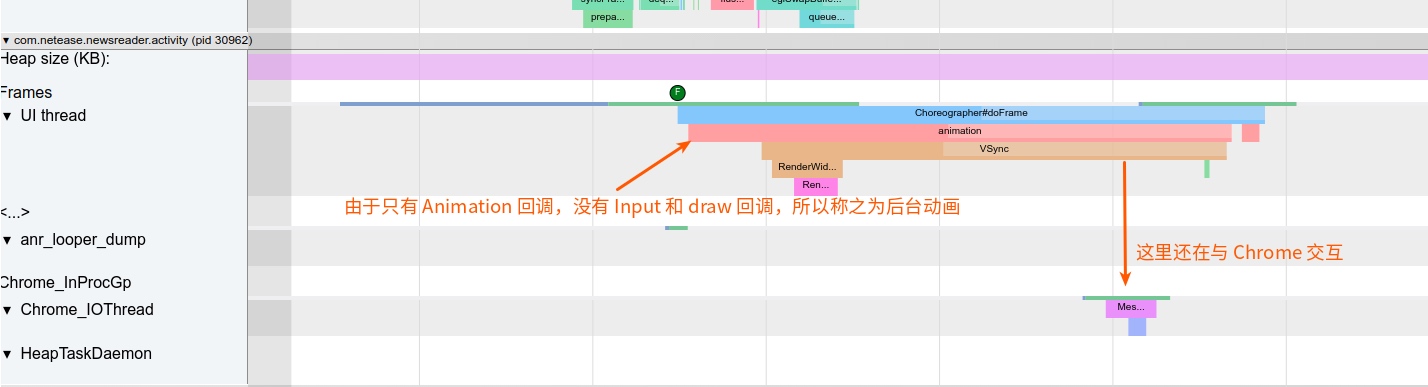
Analysis of the CPU usage shows that the NetEase News process is one of the top consumers of the foreground CPU budget while in the background. This is a clear case of battery drain.
Further inspection using Method Trace reveals that the issue stems from the Lottie animation library by Airbnb. The animation was set to loop but was never paused when the view became invisible, causing it to trigger onAnimationUpdate indefinitely.

Case 2: QQ Music
Opening QQ Music and then returning to the home screen yields similar results in Systrace and Method Trace.

The Method Trace for QQ Music shows three separate Lottie animations that fail to stop in the background—a slightly more severe case than NetEase News.
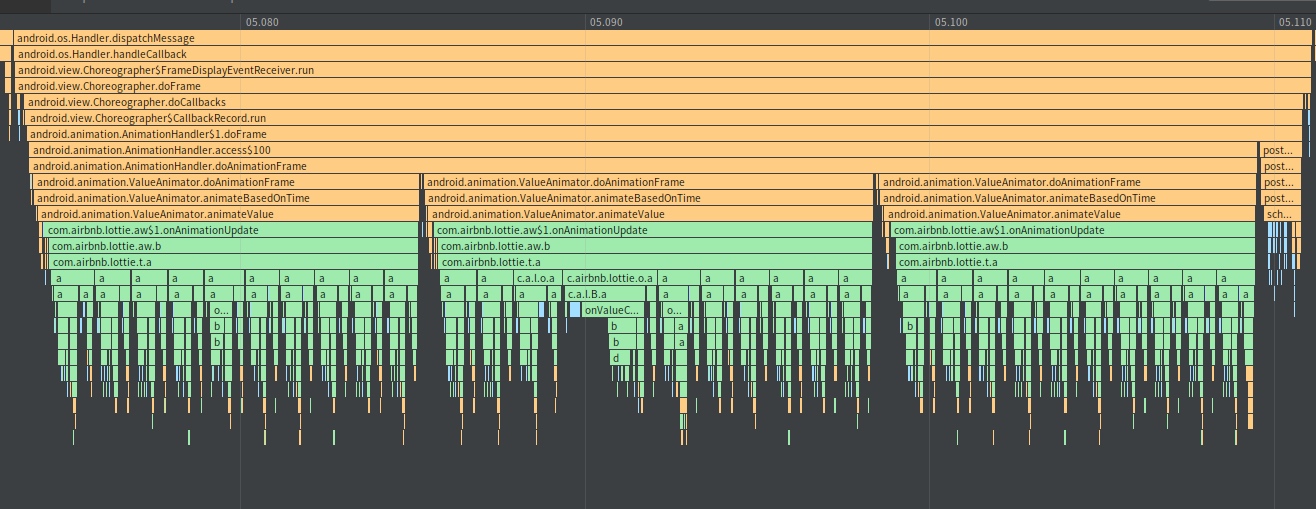
Zoomed-in view:

It’s worth noting that this isn’t exclusively a Lottie issue; any standard Android animation can suffer from this if it isn’t properly cleaned up.
Root Cause
The fundamental problem is that the app fails to pause animations when it becomes invisible. Because the app is backgrounded, the system optimizes away input and draw callbacks, but CALLBACK_ANIMATION continues to fire. Since no actual drawing occurs, the CPU cycles spent calculating animation frames are entirely wasted.
Development Recommendation
This issue has been discussed in the Lottie GitHub issues.
Problem Summary from GitHub:
“I noticed quite some CPU usage when the app is in the background… It seems looping animations do not pause/stop when the
LottieAnimationViewis off screen or the Activity is paused. This is likely due to cleanup code only being inonDetachedFromWindow(), which isn’t always called when an Activity sleeps or when a view’s visibility changes toGONEorINVISIBLE.”
The Solution:
Override onVisibilityChanged in your view or listen to life-cycle events in your Activity/Fragment to explicitly pause animations.
1 |
|
In short: When your app is invisible, call pauseAnimation() on everything!!
About Me && Blog
(Links and introduction)